


Most product teams don't wake up one day and decide to run twelve overlapping tools. It happens quietly. A new PM brings their favorite roadmapping app. An engineering lead spins up a second issue tracker for "just this one project." Design lives in one place, specs in another, decisions buried in Slack threads nobody can find three weeks later. Nobody's at fault, and that's exactly why it gets bad.
The cost isn't really the license fees, though those do add up. The real cost is the tax on every single handoff. When your roadmap lives in one tool, your tickets in another, and your customer feedback in a third that doesn't talk to either, people spend their days copy-pasting context and reconciling versions instead of shipping. A tooling consolidation strategy isn't about cutting subscriptions—it's about removing the friction that quietly slows an entire org down. This is a systems problem, so treat it like one.
Why tool sprawl is a coordination failure, not a purchasing failure
People get this wrong pretty consistently. They see six project tools and assume the fix is "pick one and force everyone onto it." Then they run a top-down mandate, half the org resents it, shadow tools reappear within a quarter, and you're worse off than before because now you have six tools plus a failed migration everyone remembers.
Tool sprawl grows because of how information flows between roles, not because someone bought the wrong software. In practice, this usually happens when three conditions stack up:
-
Teams grow faster than the process that connects them, so each new pod solves its own tooling gap locally.
-
No single owner is accountable for the "system of record," so every tool becomes a partial source of truth.
-
Migrations are treated as one-time events instead of ongoing hygiene, so old tools never actually get retired—they go dormant and then quietly come back.
The number of tools in a scaling product org tends to track with the number of unresolved handoff boundaries. Twelve tools usually means twelve places where two teams couldn't agree on where the work lived. So before you consolidate anything, you're really mapping where coordination breaks—the tools are just the symptom.
What actually breaks as you scale
At ten people, tool sprawl is annoying. At eighty, it's expensive in ways that don't show up on a single invoice.
Eliminate product chaos and align your team.
Itemyly helps you plan, prioritize, and track every product milestone seamlessly.
- Centralized roadmap management
- Stakeholder collaboration
- Release tracking & analytics
No credit card required
The first thing to go is traceability. A product decision made in one tool, implemented via tickets in another, validated by data in a third—when those three don't link, you lose the thread from "why we built this" to "what shipped" to "did it work." New hires can't reconstruct history. Post-incident reviews turn into archaeology.
The second is planning reliability. If your capacity estimates live somewhere separate from where work actually gets tracked, your forecasts drift from reality fast. This is the same failure mode that makes delivery commitments unreliable—the plan and the execution live in different worlds. If you've read our piece on turning roadmap epics into reliable delivery bands, that connective tissue breaks the moment your forecasting tool and your tracking tool stop agreeing.
The third, and probably the most underrated, is decision decay. Duplicate tools create duplicate answers. Someone updates the roadmap in Tool A but not Tool B, and now half the org is planning against a version that's two weeks stale. Nobody notices until a launch date slips and everyone points at a different screen.
A quick inventory matrix before you touch anything
Don't start migrating. Start counting. The single most useful artifact here is a tool inventory scored against a few dimensions—not just "what do we pay for" but "what job does this actually do and who depends on it."
| Tool | Primary job | Teams using it | Overlaps with | Data locked in? | Monthly cost | Keep / Merge / Kill |
|---|---|---|---|---|---|---|
| Roadmap App A | Roadmapping | Product, Exec | Roadmap App B | Medium | ~$400 | Keep (system of record) |
| Roadmap App B | Roadmapping | 2 pods | Roadmap App A | Low | ~$180 | Kill |
| Issue Tracker | Delivery | Eng, QA | — | High | ~$900 | Keep |
| Feedback Tool | Customer input | Product, Support | Spreadsheet | Medium | ~$250 | Merge into tracker |
| Spec Wiki | Docs | Everyone | Slack pins | Low | ~$120 | Keep |
Prioritize exportability when deciding whether a tool is safe to kill.
The column that matters most is "Data locked in?" A cheap tool with high lock-in is more dangerous than an expensive one you can export cleanly. Classic example: a $180/month roadmapping app looks like an easy kill until you realize eight quarters of decision history live inside it with no clean export path. That's a migration hazard, not a line item.
Fill this in honestly and half your decisions make themselves.
Decision criteria: how to actually choose the survivors
Once the inventory is in front of you, resist the urge to pick tools based on who has the loudest opinion. Score each candidate against criteria that reflect operational reality, not feature checklists.
The criteria that hold up over time:
-
Depth of integration — Does it connect to the two or three tools it absolutely must talk to? A slightly worse tool that integrates natively usually beats a better tool that requires manual sync.
-
Breadth of adoption — How many teams already live in it daily? Migrating away from a deeply embedded tool costs far more than the license.
-
Data portability — Can you get your history out if you're wrong? Never consolidate onto something you can't leave.
-
Coordination fit — Does it match how work actually flows between your roles, or does it force an artificial workflow?
-
Total handoff cost — Not the license price. The time people spend moving information in and out of it.
The mistake teams make is over-weighting features and under-weighting adoption gravity. The best tool on paper that nobody uses is a worse choice than the decent tool everyone already opens first thing in the morning.
Migration waves, not a big-bang cutover
Nothing wrecks a consolidation faster than trying to move everything at once. Big-bang cutovers fail because they assume you can freeze work while you migrate, and you can't—product teams don't get to stop shipping for two weeks.
Run it in waves instead. This mirrors how mature teams retire technical debt in staged phases rather than all at once—the logic in our writeup on phased technical-debt retirement applies almost directly here, because a tool migration is a form of debt retirement.
A sane wave sequence looks like this:
-
Wave 0 — Freeze new sprawl. Before migrating anything, stop the bleeding. No new tools without going through the inventory. This alone slows the problem considerably.
-
Wave 1 — Low-risk, low-lock-in kills. Retire the duplicate tools that only a couple of people use and that export cleanly. Fast wins build credibility.
-
Wave 2 — Merge overlapping systems. This is the hard middle. Move feedback into the tracker, consolidate two roadmapping tools into one. Expect this to take longer than you planned.
-
Wave 3 — Migrate the system-of-record data. The high-lock-in, high-history stuff last, when your process is proven and your team trusts the new setup.
Each wave should have a clear rollback path. If Wave 2 goes sideways, you don't want it contaminating Wave 3.
The diagram below shows how decisions and transitions actually move through this process—including where go/no-go calls happen and what rollback looks like between stages.
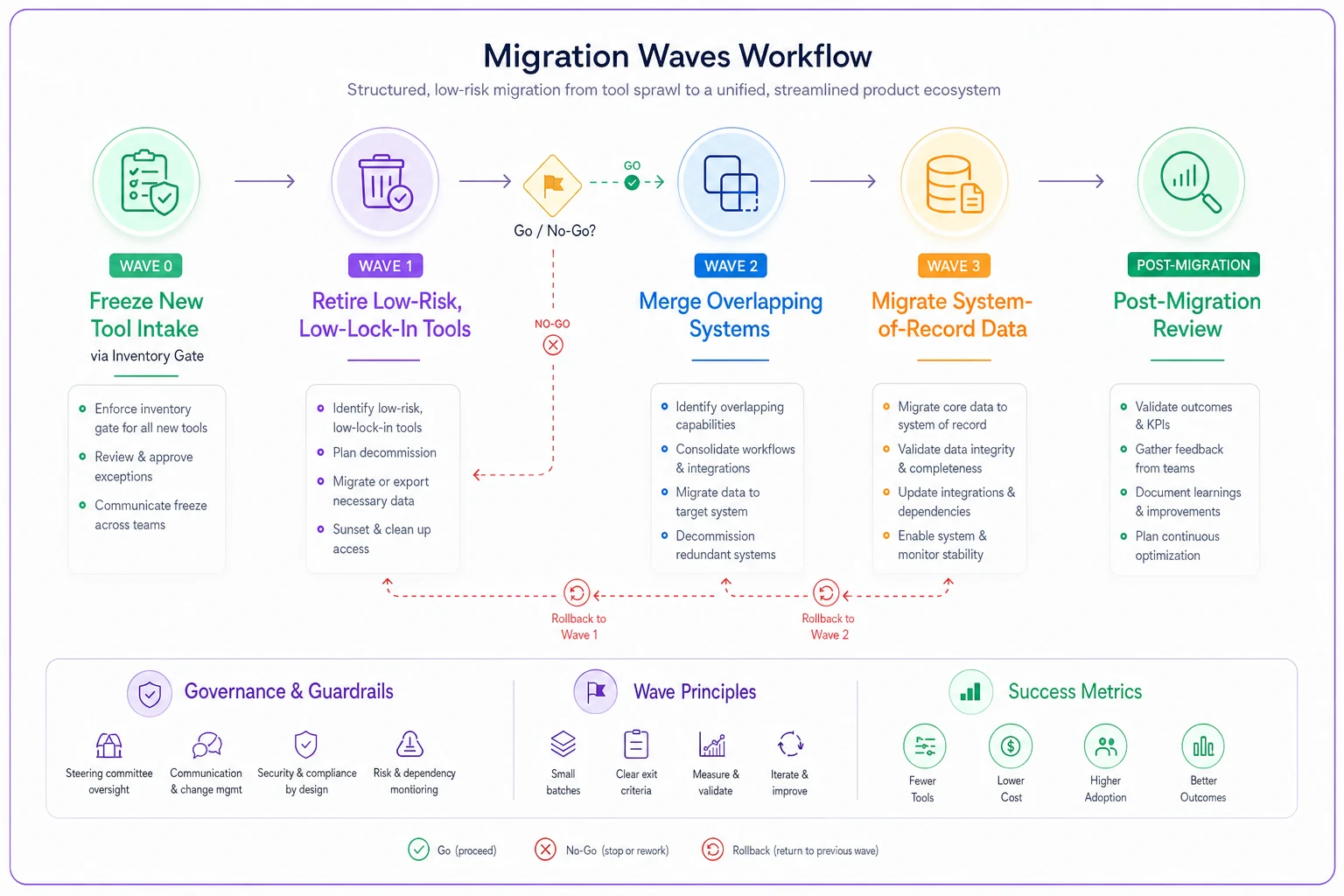
Use the workflow to plan go/no-go decisions and rollback points.
A pilot pattern that actually tells you something
Before you commit a whole org to a merged workflow, pilot it with one team—but do it correctly. A pilot that's too clean tells you nothing. The point isn't to prove the tool works in ideal conditions; it's to find where the workflow breaks under real load.
Pick a pilot team that is:
-
Mid-complexity, not your easiest or hardest team
-
Willing to give honest feedback rather than just being polite
-
Running enough active work that friction shows up quickly
Run the pilot for two to four weeks watching a short list of things: how long handoffs take, how often people fall back to the old tool, and whether anything got lost in the transition. That "fell back to the old tool" metric is the honest one. If people keep opening the thing you're trying to kill, your new workflow has a gap somewhere. Find it before you scale.
A short real scenario
A roughly 60-person product org running two roadmapping tools, three trackers, and a pile of spreadsheets for feedback. Planning meetings routinely burned the first 20 minutes reconciling which roadmap was "real." After inventorying properly, they killed one roadmapping tool and one tracker in the first two waves, then merged feedback into the surviving tracker over the next quarter.
The measurable change wasn't dramatic in dollars—maybe $600–$800/month in saved licenses. The real win was the reconciliation time. Planning meetings stopped opening with "wait, which version is this?" and roughly a day a week of cross-tool copy-pasting across the PM group quietly disappeared. Nobody wrote a press release about it, but delivery predictability improved noticeably within two quarters.
Change management, because this is really a people migration
The technical migration is the easy 40%. The other 60% is convincing people who liked the old way. Every consolidation that stalls does so at the human layer, not the data layer.
A lightweight change checklist that tends to work:
-
Name a single owner for the consolidated system of record. Not a committee. One person accountable for keeping it clean.
-
Announce the why, not just the what. "We're cutting tools to stop losing decisions" lands better than "we're standardizing on Tool X."
-
Migrate history, not just going-forward data. People abandon new tools when their past context isn't there.
-
Set a hard sunset date for killed tools, and actually disable access on that date. Dormant tools creep back.
-
Keep a one-page map of "where does X live now" for the first 90 days. Half your support questions will be answered by it.
The pattern to avoid: declaring victory the moment data is migrated. The migration isn't done when the data moves—it's done when people stop reaching for the old tool out of habit.
When consolidation actually makes sense (and when it doesn't)
Consolidation isn't automatically the right move. Sometimes multiple tools exist because different teams genuinely have different needs, and forcing them together creates a worse workflow for everyone.
This makes sense when: you're losing traceability across handoffs, planning meetings waste time reconciling versions, new hires can't reconstruct decisions, or you're paying for real overlap where two tools do the same job for the same people.
This is a bad idea when: the "duplicate" tools actually serve genuinely different workflows, when you're mid-way through a critical launch and can't absorb the disruption, or when the only real driver is cost-cutting and you haven't measured the handoff friction. Consolidating for the sake of a tidier tool list, with no coordination problem underneath, just trades one kind of friction for another.
Who should not do this right now: teams in the middle of a major reorg. Wait until the team boundaries settle, because you'll just have to migrate again once the org chart changes.
The system view
Tool sprawl is a mirror of your org's coordination boundaries. Every redundant tool marks a place where two teams couldn't agree on where work lived, and every stale version marks a handoff nobody owns. Fixing it isn't a purchasing exercise—it's the work of deciding, explicitly, how information should flow between your roles and then shaping the tooling to match.
Do the inventory first. Choose survivors on adoption and portability, not features. Migrate in waves with real rollback paths, pilot honestly enough to find the breaks, and treat the human side as the majority of the work. The teams that stay fast aren't the ones with the fewest tools—they're the ones where the tools they kept actually connect.
Tool sprawl is a mirror of your org's coordination boundaries. Every redundant tool marks a place where two teams couldn't agree on where work lived, and every stale version marks a handoff nobody owns. Fixing it isn't a purchasing exercise—it's the work of deciding, explicitly, how information should flow between your roles and then shaping the tooling to match.
Do the inventory first. Choose survivors on adoption and portability, not features. Migrate in waves with real rollback paths, pilot honestly enough to find the breaks, and treat the human side as the majority of the work. The teams that stay fast aren't the ones with the fewest tools—they're the ones where the tools they kept actually connect.
Ready to elevate your product management?
Join 2,000+ product teams using Itemyly to accelerate delivery, improve alignment, and build better products.