


Feature deprecation feels straightforward until you're dealing with 2,000 users who built critical workflows around something you need to sunset. The messages start coming in around 9am Monday—confused, angry, sometimes desperate. Your support team scrambles to provide workarounds. Product gets pulled into emergency meetings. Engineering debates whether to roll back.
Why most deprecations turn into crisis management instead of controlled transitions
Feature deprecation feels straightforward until you're dealing with 2,000 users who built critical workflows around something you need to sunset. The messages start coming in around 9am Monday—confused, angry, sometimes desperate. Your support team scrambles to provide workarounds. Product gets pulled into emergency meetings. Engineering debates whether to roll back.
This keeps happening because teams treat deprecation like flipping a switch rather than orchestrating a controlled transition. They focus on the technical removal and miss the operational complexity of transitioning real users with real dependencies.
The migration patterns that actually protect users
Most feature deprecations fail in predictable ways. Users discover changes through error messages. Migration paths require technical knowledge your users don't have. Rollback becomes impossible after the first batch of users converts their data.
Eliminate product chaos and align your team.
Itemyly helps you plan, prioritize, and track every product milestone seamlessly.
- Centralized roadmap management
- Stakeholder collaboration
- Release tracking & analytics
No credit card required
Low-risk deprecations affect features with minimal usage, clear alternatives, and no data dependencies. Think removing a rarely-used report filter or consolidating duplicate navigation paths. These can move quickly with basic communication.
Medium-risk deprecations touch active features where users need to adjust workflows but don't lose functionality. Maybe you're replacing an old dashboard with a new visualization system. Users need time and guidance, but the transition path is clear.
High-risk deprecations involve features deeply embedded in user workflows—especially those with data implications or integration dependencies. Removing a legacy API that powers customer integrations. Deprecating a workflow that hundreds of users automated around. These require real orchestration, not just a sunset date.
The risk level determines everything: timeline, communication strategy, migration support, and rollback triggers.
Decision gates that prevent premature deprecation
Teams often commit to deprecation timelines before they fully understand the impact. They announce sunset dates, then discover blocking issues halfway through migration. Walking that back is hard, and the trust damage lingers.
A phased migration needs clear decision gates between each stage. These aren't just checkpoints—they're genuine go/no-go moments where you might extend timelines or cancel the deprecation entirely.
-
Gate 1
Migration readiness
— Before any user communication. You've identified every affected user segment. The replacement handles all critical use cases. Migration tools are built and tested. Support documentation exists. If anything is missing, you don't proceed. -
Gate 2
Early adopter validation
— After your pilot group completes migration. Are they successful? What problems emerged? Did the replacement actually meet their needs? You need at least 50 successful migrations before expanding. -
Gate 3
Scaled migration health
— At the 25% migration point. Is your support queue manageable? Are users self-serving through documentation? Has any data been lost? These metrics determine whether you accelerate, hold pace, or pause. -
Gate 4
Final migration feasibility
— At 75% completion. Can the remaining users actually migrate? Some have edge cases or technical constraints you didn't anticipate. This group might need specialized support or extended timelines.
Without these gates, you're gambling that your initial migration plan was perfect. It never is.
Communication timelines that build trust instead of destroying it
The typical deprecation announcement reads like a corporate decree: "Feature X will be discontinued on Date Y. Please migrate to Feature Z." Users feel ambushed. They scramble to understand the impact. Trust erodes fast.
Your communication timeline should give users control over their migration experience—multiple touchpoints with increasing specificity.
T-minus 90 days: Initial awareness campaign. This isn't about the deprecation—it's about the improved experience coming. "We're investing in a new approach to [workflow]" gets users curious rather than defensive. Include a timeline preview so power users can start planning.
T-minus 60 days: Detailed migration announcement. Now you provide specifics: what's changing, why it matters, how users benefit. Include a migration guide preview. Open a feedback channel for concerns. Your tone acknowledges the disruption while emphasizing the value.
T-minus 45 days: Segment-specific outreach. Different user groups need different messages. Heavy users of the deprecated feature get personalized emails with their specific usage data. Occasional users get simplified migration paths. Enterprise accounts get dedicated support options.
T-minus 30 days: Migration resources launch. Video walkthroughs, step-by-step guides, office hours—everything users need to succeed. Make these resources findable from within the deprecated feature itself. Users shouldn't have to hunt for help.
T-minus 14 days: Individual user notifications. Anyone who hasn't started migration gets direct outreach—not a bulk email, but something personalized based on their usage patterns. "We noticed you use [specific feature] roughly 12 times per week. Here's your specific migration path."
T-minus 7 days: Support escalation. Remaining users get phone calls or direct support. Yes, this is expensive. It's cheaper than losing customers or cleaning up post-deprecation chaos.
The internal communication timeline runs parallel but starts earlier. Your support team needs training before the first user announcement. Sales needs talking points for concerned prospects. Engineering needs to understand which edge cases might emerge.
Migration UX patterns that guide rather than confuse
Users going through deprecation often feel lost. They click familiar buttons that redirect somewhere else. Workflows they've memorized suddenly break. The cognitive load becomes overwhelming.
Your migration UX should feel like a guided transition, not an abrupt change. A few patterns that actually work:
Progressive disclosure reveals the new feature while maintaining the old. Users see both options with clear labeling—"Current version" and "New experience." They can explore without commitment. That psychological safety encourages experimentation.
Inline migration prompts appear during normal workflow execution. When users access the deprecated feature, they see a non-blocking message: "This report is moving to Analytics Hub. Try it now or continue with current version." The choice stays theirs.
Migration state persistence remembers where users are in their transition. If someone starts migrating data but doesn't finish, the system picks up where they left off. Next login, they see: "Continue your migration (15 minutes remaining)"—not a blank start.
Contextual help layers provide support without forcing users out of their workflow. Hovering over new elements shows comparisons to familiar ones. "This replaces the Export button you're familiar with." Users learn through doing rather than reading documentation.
Graduated enforcement slowly increases migration pressure. First month: optional migration with benefits highlighted. Second month: deprecated features show warning banners. Third month: certain operations require using the new system. This staged approach prevents shock while ensuring progress.
The most critical pattern, though? Reversible migration. Users should be able to try the new system and revert if needed. That safety net dramatically increases migration willingness. Roughly 70% of users who can safely experiment end up staying with the new feature.
``
[Awareness Campaign] → [Migration Resources Live] → [Segment Outreach] → [Individual Notifications] → [Support Escalation] → [Sunset]
``
The flow below shows these phases and gates.
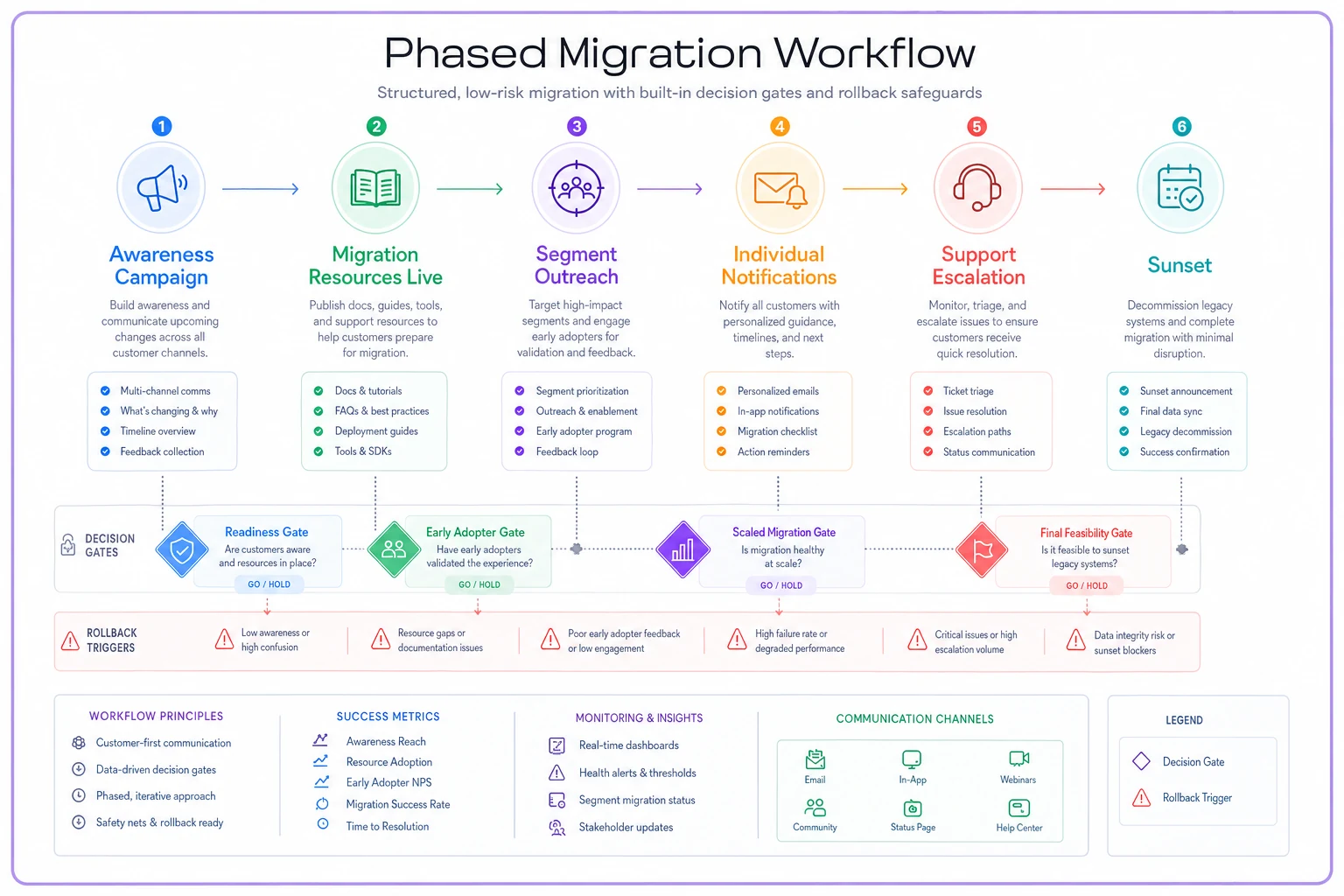
Each stage gates on the decision criteria above. If a stage reveals unexpected friction, you pause and reassess before moving forward.
Rollback triggers that prevent disasters
Every deprecation needs a ripcord—clear conditions that trigger immediate rollback. Too many teams push through warning signs because they've already invested so much in the migration. They prioritize timeline over user success, and it usually costs them.
Your rollback triggers should be defined before migration begins and treated as non-negotiable. When these thresholds hit, you stop and reassess.
| Trigger Type | Warning Threshold | Rollback Threshold |
|---|---|---|
| Support ticket volume | 2x baseline | 3x baseline |
| Overall product usage drop | 10% decrease | 20% decrease |
| Combined feature usage (old + new) | Below 90% of original | Below 85% of original |
| Page load performance | +1 second increase | +2 second increase |
| Error rate | Above 0.5% | Above 1% |
| Data discrepancy | Any anomaly flagged | Above 0.1% discrepancy |
Raw support volume isn't enough—you need to categorize issues. Migration confusion is expected. Data loss is not. Critical workflow failures demand immediate response.
On usage: a 20% decrease in feature usage might mean successful migration. A 20% decrease in overall product usage means users are abandoning ship. Track both the deprecated feature and its replacement. If combined usage drops below 85% of original levels, users aren't finding value in the new approach.
The new feature should also outperform the old on performance. If page loads increase significantly, if error rates spike above 1%, if data processing takes noticeably longer—the replacement isn't ready for scale.
Also watch account-level metrics. If monthly active users drop among migrating accounts, or NPS scores tank, the migration is damaging customer relationships beyond the specific feature.
The key is making rollback triggers operational rather than political. When triggers hit, rollback happens—no meetings, no debate. You can restart migration after fixing the underlying issues.
Acceptance criteria that define actual success
Most teams measure deprecation success by asking "did we turn off the old feature?" That's like measuring surgery success by asking "did we remove the organ?" The real question is whether the patient is doing well.
-
Functional parity validation — every workflow possible in the old system should be achievable in the new one. But parity alone isn't enough. The new workflow should be demonstrably better: faster, clearer, or more capable.
-
User proficiency metrics — track how long users take to complete common tasks. Initial slowdown is expected. But within 30 days, task completion times should match or beat the deprecated feature. If users remain slower after a month, the new design has usability problems.
-
Adoption depth — it's not enough that users access the new feature. Are they using it fully? If the deprecated feature had five common operations, are users discovering all five in the replacement? Shallow adoption suggests missing functionality or poor discoverability.
-
Downstream impact monitoring — features don't exist in isolation. If deprecating a reporting tool causes users to export more data manually, you've just created a new problem. Track related features for unusual patterns that suggest workaround behavior.
-
Business metric stability — if you deprecated a customer communication feature, are customer satisfaction scores holding? If you removed a team collaboration tool, is project velocity maintained?
Set clear thresholds for each criterion. User proficiency must reach 90% of original speeds. Adoption depth must hit 80% within 60 days. Business metrics can't drop more than 5%. These aren't arbitrary—they represent the minimum viable migration.
For more on how technical decisions during migrations can create downstream problems, see technical debt and its effect on delivery timelines and managing cross-team launches without the usual chaos.
The hidden complexity of partial migrations
Some users can't or won't migrate completely. They might have automated systems built around deprecated features. They might lack technical resources. They might simply refuse. These partial migrations become ongoing operational burden faster than most teams expect.
One approach: migration concierge service. For your highest-value holdouts, provide hands-on support. Yes, this might mean manually migrating their data or rebuilding their integrations. The cost is justified for key accounts.
Another pattern: extended sunset periods for specific segments. Enterprise customers might get an additional six months with premium support pricing. This generates revenue while buying time for complex migrations.
Hybrid states—where old and new features coexist temporarily—add complexity but might be necessary for compliance or audit requirements. Users can access deprecated features for historical data while using new features for current work.
The hardest decision is when to force migration versus accepting permanent holdouts. If 2% of users absolutely refuse to migrate, is it worth maintaining legacy systems indefinitely? Sometimes yes—if those 2% generate 20% of revenue. Other times, you need to accept strategic churn. There's no universal answer, and teams that pretend otherwise usually regret it.
Building organizational memory around deprecation patterns
Each deprecation teaches lessons, but teams rarely capture this knowledge systematically. The next product manager inherits none of the hard-won insights.
Create a deprecation retrospective template that captures:
-
Initial risk assessment versus actual risk
-
Communication approaches that resonated
-
Unexpected user segments affected
-
Support issues that emerged
-
Technical challenges discovered
-
Rollback near-misses
-
Migration tools that proved essential
More importantly, track patterns across deprecations. Maybe your enterprise segment consistently needs 2x longer migration windows. Maybe email announcements underperform in-app notifications every time. Maybe users in certain regions have different migration behaviors than others.
This institutional knowledge compounds. While competitors stumble through their first major deprecation, you're executing a playbook refined across dozens of migrations. That gap is genuinely hard to close once it forms.
The technology question: when automation helps versus hurts
Product teams often reach for technical solutions immediately. They build elaborate migration wizards, automated data transfer systems, and intelligent routing layers. Sometimes this helps. Often it just adds complexity to an already complex situation.
The best migrations combine human judgment with technical efficiency. Use automation for data migration—humans make mistakes copying fields at scale. Use humans for decision support—automation can't understand business context.
AI-powered operational software can help orchestrate the migration process itself. Instead of manually tracking which users have migrated, which need support, and which are at risk, these platforms can monitor migration health in real-time, automatically trigger support outreach when users struggle, and flag accounts showing signs of frustration before they churn.
That said, resist the temptation to over-automate. A fully automated migration feels impersonal when users are already stressed about change. The most successful migrations feel supported, not processed.
Making peace with imperfect migrations
No migration achieves 100% success. Some users will be unhappy. Some workflows will be disrupted. Some data will need manual cleanup. Accepting this reality leads to better decisions throughout the process.
The goal isn't perfection—it's minimizing damage while maximizing value. If 94% of users successfully migrate and find the new feature genuinely better, that's a win. The remaining 6% matter, but they can't hold the entire product hostage.
This requires some emotional preparation for the team. Support will have rough weeks. Product will face criticism. Engineering will discover edge cases they missed. Having clear success criteria defined upfront helps weather that storm without second-guessing every decision.
Your feature deprecation playbook is ultimately about respect—respecting the workflows users have built, the time migration requires, and the trust relationship at stake. When users feel respected through the process, they forgive the inconvenience. When they feel ambushed or abandoned, they remember it.
The deprecations you handle today set expectations for every future change. Execute them thoughtfully, and users become more willing to evolve with your product. Botch them, and users resist even beneficial changes, assuming more pain is coming. That reputation, good or bad, follows your product for a long time.
The deprecations you handle today set expectations for every future change. Execute them thoughtfully, and users become more willing to evolve with your product. Botch them, and users resist even beneficial changes, assuming more pain is coming. That reputation, good or bad, follows your product for a long time.
Ready to elevate your product management?
Join 2,000+ product teams using Itemyly to accelerate delivery, improve alignment, and build better products.