


The nastiest integration failures don't come from your own deploys. They come from a partner shipping a change on a Thursday afternoon that you had no idea was coming, and finding out three days later when a customer emails support asking why their sync stopped.
If you own integrations with payment processors, shipping carriers, CRMs, identity providers, or any third-party API, your partner integration roadmap isn't really about your code. It's about coordination timing — knowing when the other side is going to change, and having a repeatable way to catch it before your users do. Most teams treat this as an afterthought. Then they spend a quarter firefighting.
This post is narrow on purpose. It covers the coordination layer specifically: a partner change calendar, compatibility windows, acceptance test templates you can actually reuse, contract-level change windows, and escalation scripts for when a partner goes quiet. Real artifacts, not theory.
Why partner changes keep catching teams off guard
The failure pattern is almost always the same, and it's not incompetence — it's a visibility mismatch.
-
The partner emails a "sunset notice" to a generic address — billing@, or the account owner who left the company last year
-
The change is buried in a developer changelog you'd have to actively monitor
-
There was notice, but it went to an engineer who read it, thought "we'll deal with that later," and never filed it anywhere
The third one is the most common and the most frustrating. The information existed inside your company. It just never made it onto the roadmap.
This is the same coordination problem that shows up in API change management and versioning windows — except now you're on the receiving end of someone else's version bump, which means you have far less control over timing.
The partner change calendar
A partner change calendar is the single artifact that fixes most of this. It's not fancy — it's a shared, always-current view of every known and expected change from every integration partner, mapped against your own release schedule.
Eliminate product chaos and align your team.
Itemyly helps you plan, prioritize, and track every product milestone seamlessly.
- Centralized roadmap management
- Stakeholder collaboration
- Release tracking & analytics
No credit card required
Here's what a workable one looks like:
| Partner | Change | Type | Partner date | Compat window | Our owner | Status |
|---|---|---|---|---|---|---|
| Stripe | API version 2024-xx | Optional upgrade | Rolling | 12 months | Payments | Monitoring |
| ShipCarrier | Rate endpoint v2 | Breaking | Mar 15 | Mar 1–Apr 30 | Fulfillment | Testing |
| IdentityCo | SAML cert rotation | Breaking | Feb 20 | 30 days | Platform | Scheduled |
| CRMVendor | Webhook field removal | Breaking | Unknown | TBD | Integrations | Chasing notice |
The columns most teams skip are compat window and status. The compat window is the overlap period where both old and new behavior work — that's your actual runway. The status tells you whether you're comfortable or whether someone needs to be chasing the partner right now.
Worth calling out: the "Unknown" and "Chasing notice" rows are the dangerous ones. A row you know is uncertain is manageable. The real damage comes from changes that aren't on the calendar at all. Part of the calendar's job is making your blind spots visible.
Where should it live? Anywhere your whole team actually looks. A dedicated board in whatever tool you use for roadmap planning works better than a spreadsheet nobody opens. The specific tool matters less than the rule that every partner change gets a row the moment anyone hears about it — even a rumor.
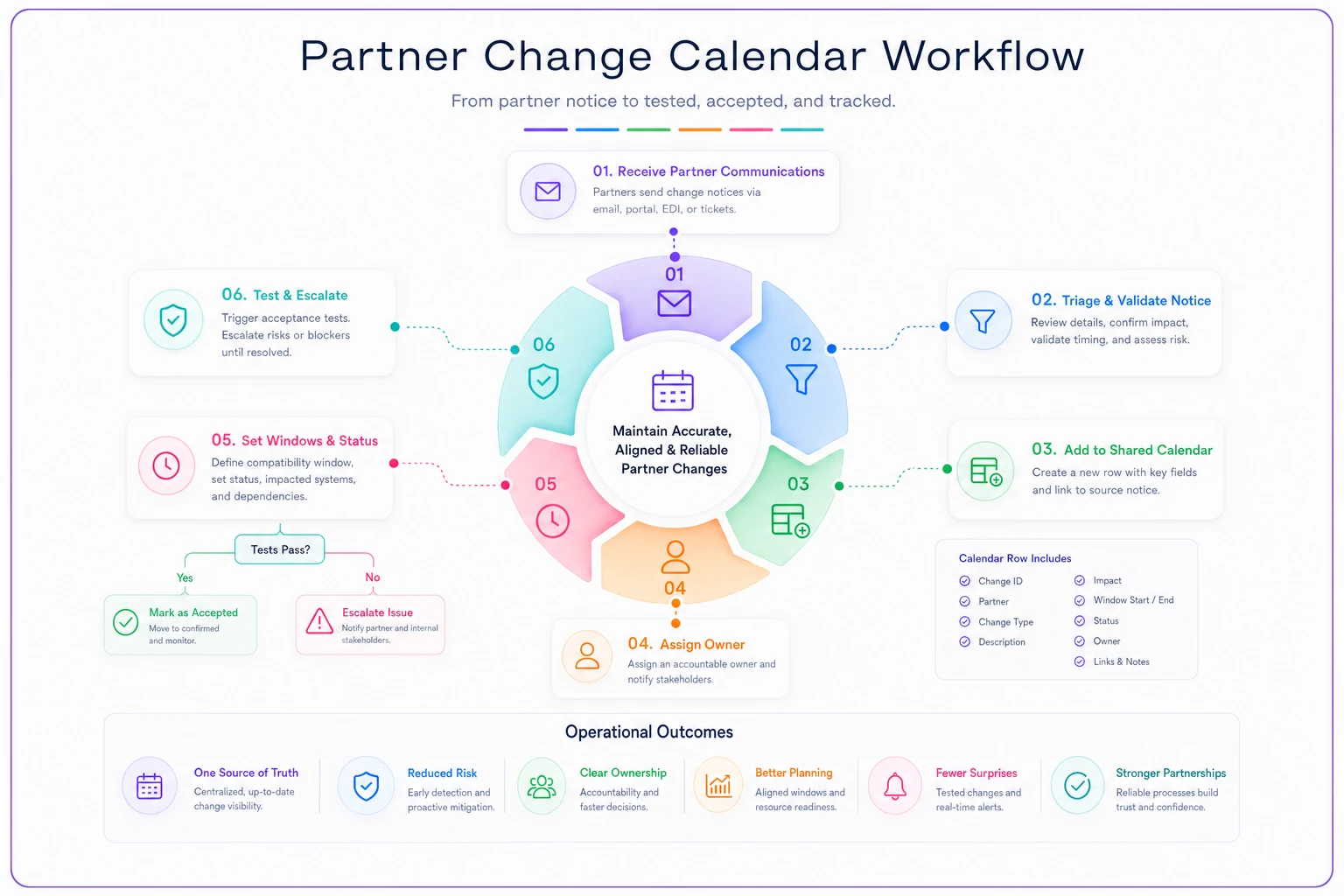
This illustrates a simple workflow to keep the calendar current and trigger the right follow-ups.
Create a rule that any partner communication mentioning a deprecation gets a calendar row the same day.
The specific tool matters less than the rule that every partner change gets a row the moment anyone hears about it — even a rumor.
Compatibility windows: what runway you actually have
A compatibility window is the period during which both the old and new versions of a partner's API behave acceptably for your integration. It's not the same as the partner's official deprecation date, and confusing the two is where teams get burned.
Partners publish a sunset date. What they don't always publish is when the old behavior starts degrading in practice — rate limits tighten, deprecated fields start returning nulls, response times on the legacy endpoint get worse because nobody's maintaining it. Your effective compatibility window often closes earlier than the official date.
A typical scenario: a partner announces a 90-day deprecation window for an endpoint. Sounds comfortable. But around day 40, they start throttling the legacy endpoint to nudge people off it. If your integration does bulk operations, you're now hitting rate limits six weeks before you thought you had to migrate.
-
The official window (what the partner promised)
-
Your planned migration target — a date you set inside the official window, with buffer
A good rule of thumb: aim to complete migration at roughly 60% of the way through the official window. If they give you 90 days, be done by day 55. That buffer absorbs throttling surprises and gives you time to run acceptance tests properly.
Partner acceptance test templates
Once you know a change is coming, you need a fast, repeatable way to verify that the new version actually works for your use case before you cut over. Most teams improvise this, and improvising is how you miss the edge case that breaks in production.
A partner acceptance test template is a pre-written checklist tied to a category of change, so you're not designing the test from scratch every time. Build a handful of these once and reuse them.
Template: Breaking API version upgrade
-
Point staging at the new version behind a flag
-
Run the full set of core transactions your product depends on — list them explicitly, don't just say "everything"
-
Compare responses field-by-field against the old version; log any field that changed shape, type, or nullability
-
Test your error handling against the new error format (this is where surprises hide)
-
Run a load test at 1.5x your normal peak against the new endpoint
-
Verify webhooks/callbacks arrive and parse correctly
-
Confirm rollback works — can you flip back to the old version cleanly?
-
Get sign-off from the integration owner and one person from the affected product area
The step people skip is #4. Partners change error formats far more often than they change success formats, and error handling is exactly what doesn't get exercised in normal testing. When a migration breaks in production, it's usually because the unhappy path changed and nobody tested it.
A short checklist to attach to any partner change before you call it done:
-
- [ ] Change is on the partner change calendar with an owner
-
- [ ] Official window and planned migration target both recorded
-
- [ ] Correct acceptance test template selected and run
-
- [ ] Error-path behavior explicitly tested
-
- [ ] Rollback verified
-
- [ ] Sign-off from integration owner + product area
Coordinating that sign-off across teams is its own small orchestration problem, and the same principles from running predictable cross-team releases apply here — clear owner, clear gate, clear rollback.
Contract change windows
Everything above assumes you find out in time. The way you guarantee that is to put change-notice terms in the contract.
A contract change window is a clause that commits the partner to giving you a defined minimum notice before any breaking change, in a defined channel, to a defined contact. This is boring legal-adjacent work that most product people avoid, and it's one of the highest-leverage things you can do for integration stability.
What to push for in the terms:
-
- Minimum notice period for breaking changes — 60–90 days is reasonable for most B2B integrations
-
- Notice channel — a specific distribution list you control, not "our changelog"
-
- A named technical contact on their side, with a commitment to keep it current
-
- Definition of "breaking" so there's no argument later about whether a change counted
You won't always get all of this, especially with large platforms where you're a small customer and the contract is take-it-or-leave-it. But for mid-size partners and anything custom, these terms are negotiable more often than people assume — vendors would rather write a clause than lose a customer to a broken integration.
When this actually makes sense
Contract change windows are worth the effort when the partner is central to your product, when a breaking change would take you more than a day to absorb, or when the partner has a history of moving fast. If a single integration touches revenue directly — payments, billing, provisioning — negotiate the clause.
When it's not worth it
For a minor, easily-replaceable integration where you could swap providers in an afternoon, don't burn negotiating capital on change-window clauses. Monitoring their changelog is fine. Spend the effort where a surprise would actually hurt.
Escalation scripts for when a partner goes dark
The calendar has a "Chasing notice" status for a reason. Sometimes you know a change is coming but the partner won't confirm timing, won't respond, or gives you a vague answer. Having scripts ready means escalation isn't something someone has to emotionally work up to writing.
Artifact 1 — First contact (friendly, informational)
> Subject: Confirming timeline — [endpoint/change] deprecation > > Hi [name], we saw the notice about [change]. We're planning our migration and want to confirm: is [date] the firm cutover, and will the legacy [endpoint] behavior stay stable until then, or should we expect rate/behavior changes earlier? Trying to schedule our testing window accurately. Thanks.
Artifact 2 — Follow-up (no response after roughly 5 business days)
> Subject: Re: Confirming timeline — need a date to plan around > > Hi [name], following up on the below. We have a hard dependency on this integration and can't finalize our migration schedule without a confirmed cutover date. Could you confirm this week, or point me to whoever owns the deprecation timeline? Appreciate it.
Artifact 3 — Escalation (still nothing, or unacceptable timeline)
> Subject: Escalating — [integration] change risks a production outage on our side > > Hi [name], looping in [their account manager / our account owner]. We still don't have a confirmed timeline for [change], and without one we're facing a real risk of a broken integration affecting [X] of our customers. We need either a confirmed date with adequate notice per our agreement, or a call this week to work out a plan. Who can own this from your side?
The progression matters. First contact assumes good faith and just asks for information. The follow-up names the dependency. The escalation names the consequence and pulls in account owners. Most partner responsiveness problems resolve at the follow-up stage — but having the escalation drafted in advance means nobody wastes a day agonizing over tone when they should just be sending it.
One thing worth noting: escalations land far better when you reference a specific number of affected customers or a concrete revenue impact. "This risks a production outage" is easy to deprioritize. "This risks breaking checkout for around 400 active accounts" tends to get a same-day reply.
A short real scenario
A mid-size logistics SaaS — somewhere around 600 business customers — integrated with a rate-and-tracking API from a shipping partner. The partner rolled out a v2 rate endpoint and set the old one to deprecate. The notice went to an engineering inbox, got skimmed, and never made it onto any roadmap.
The old endpoint started throttling about six weeks before the official sunset. Rate lookups began timing out during peak hours, support tickets climbed, and for a couple of days the team thought it was their own infrastructure. Tracing it back to the partner's throttling ate roughly three engineer-days, plus churn risk from customers who couldn't quote shipping rates during a busy stretch. After that, they set up a partner change calendar and made one rule: any partner communication mentioning a deprecation, sunset, or version change gets a calendar row the same day, with an owner assigned. They also built out acceptance test templates for API version changes. The next partner migration — a webhook format change a few months later — was handled inside its window with no customer-visible impact. Not because the change was smaller, but because it was on the calendar with enough runway to test properly.
Bringing it together
A partner integration roadmap lives or dies on visibility and timing, not on how clean your integration code is. The pieces reinforce each other: the calendar makes changes visible, compatibility windows tell you your real runway, acceptance test templates let you verify fast, contract change windows guarantee you get notice, and escalation scripts keep you from losing days when a partner goes quiet.
None of this requires heavy tooling. It requires a shared place to track partner changes, a discipline that every deprecation notice gets logged the day it arrives, and a few reusable templates so nobody's improvising under pressure. Build even just the calendar and the escalation scripts, and you'll catch most of the surprises that currently turn into support fires — spending your integration time migrating on your schedule instead of the partner's.
None of this requires heavy tooling. It requires a shared place to track partner changes, a discipline that every deprecation notice gets logged the day it arrives, and a few reusable templates so nobody's improvising under pressure. Build even just the calendar and the escalation scripts, and you'll catch most of the surprises that currently turn into support fires — spending your integration time migrating on your schedule instead of the partner's.
Ready to elevate your product management?
Join 2,000+ product teams using Itemyly to accelerate delivery, improve alignment, and build better products.