



Most accessibility audits arrive the same way. Someone runs an automated scan or hires a consultant, and three weeks later a PDF lands in your inbox with 380 issues, each tagged with a WCAG success criterion number nobody on the team recognizes. The PM opens it, scrolls, feels a small wave of dread, and files it under "we'll tackle this next quarter."
Next quarter never comes. Or it comes as a panicked scramble because a customer's procurement team asked for a VPAT, or worse, a demand letter showed up.
The problem isn't the audit itself. A flat list of 380 issues is useless for planning. You can't sprint against it, you can't estimate it, and you can't tell leadership which 30 fixes actually matter versus the 200 that are cosmetic contrast tweaks on a settings page three users visit a month. What you need is a way to turn that pile into a sequenced, defensible plan — an accessibility remediation roadmap that treats WCAG fixes like any other engineering work: scored, scheduled, gated, and monitored.
This post covers four things: scoring issues on a heatmap of user impact versus remediation effort, choosing between sweep-style and continuous sprint patterns, setting gating rules so critical fixes actually block releases, and defining acceptance criteria that PMs can hold a team to.
Start by killing the flat list: the impact-vs-effort heatmap
The single most useful move is to stop treating every audit finding as equal. A missing alt attribute on a decorative icon and a keyboard trap on your checkout flow are both "WCAG issues," but one is a shrug and the other loses you money and invites legal risk.
Score every finding on two axes.
User impact — how badly does this break the experience for someone relying on assistive tech, keyboard navigation, or high-contrast modes? A keyboard trap that prevents completing a purchase is catastrophic. A slightly-off contrast ratio on a tooltip is minor. Weight this by traffic too. A high-severity issue on a page nobody visits matters less than a medium issue on your signup page.
Remediation effort — is this a one-line ARIA label, or does it require rebuilding a custom date-picker component used in 40 places? Effort estimates should come from an engineer who's actually looked at the component, not a guess from the audit tool.
Plot them and you get four quadrants:
| Quadrant | Impact | Effort | What it means | Action |
|---|---|---|---|---|
| Do now | High | Low | Big wins, cheap | Fix immediately, this sprint |
| Plan carefully | High | High | Matters a lot, expensive | Break into a mini-project, schedule across sprints |
| Batch later | Low | Low | Easy but minor | Sweep in a cleanup sprint |
| Question it | Low | High | Expensive and barely matters | Challenge whether it's worth doing at all |
The most common mistake teams make is spending their first burst of energy on the "batch later" quadrant — the easy, satisfying, low-impact fixes — because they're quick and feel like progress. You close 60 tickets in a week and the burndown looks great. Meanwhile the keyboard trap on checkout is still sitting there because it's scary and hard.
A typical example: an audit came back with about 290 findings for a mid-size B2B app. Roughly 180 of them were low-impact contrast and label issues clustered in admin screens. Only around 25 were high-impact issues on core flows — login, the main dashboard, and a data-export wizard. Those 25 were where nearly all the actual user harm and legal exposure lived. Scoring made that obvious in an afternoon; the flat list had hidden it for months.
If you've built a technical debt heatmap before, this will feel familiar — the mechanics are close to what's described in this scoring model for technical debt. Accessibility is a specialized flavor of the same problem: a pile of known issues competing with feature work for the same sprint capacity.
Two sprint patterns: sweeps vs continuous, and when each fits
Once things are scored, you have to decide how the work flows into your sprints. There are two patterns, and picking the wrong one is where a lot of remediation efforts stall.
Eliminate product chaos and align your team.
Itemyly helps you plan, prioritize, and track every product milestone seamlessly.
- Centralized roadmap management
- Stakeholder collaboration
- Release tracking & analytics
No credit card required
The sweep pattern dedicates a block of time — a full sprint, sometimes two — to accessibility work exclusively. The team stops feature work and grinds through a batch. This works well for the "batch later" quadrant and for the initial cleanup when you first get an audit and have a large backlog to knock down.
The continuous pattern folds a fixed allocation of accessibility work into every sprint — say, 15% of capacity, or two specific tickets per person per sprint. Nobody stops feature work, but the debt drains steadily.
How they compare in practice:
| Factor | Sweep | Continuous |
|---|---|---|
| Best for | Large initial backlog, low-effort batches | Ongoing maintenance, preventing regressions |
| Momentum | High short-term, easy to measure | Steady, easy to sustain |
| Risk | Gets deprioritized when a deadline hits | Individual tickets get quietly skipped |
| Context switching | Low (focused block) | Higher (interleaved with features) |
| Leadership visibility | Very visible ("accessibility sprint") | Nearly invisible unless you report it |
What tends to work is a hybrid. Run one or two sweeps up front to clear the "do now" and "batch later" quadrants and get your numbers down fast. Then switch to continuous mode to handle the "plan carefully" quadrant piece by piece and, critically, to stop new issues from piling up.
A simple workflow can make it obvious when to run a sweep versus keeping a continuous allocation.
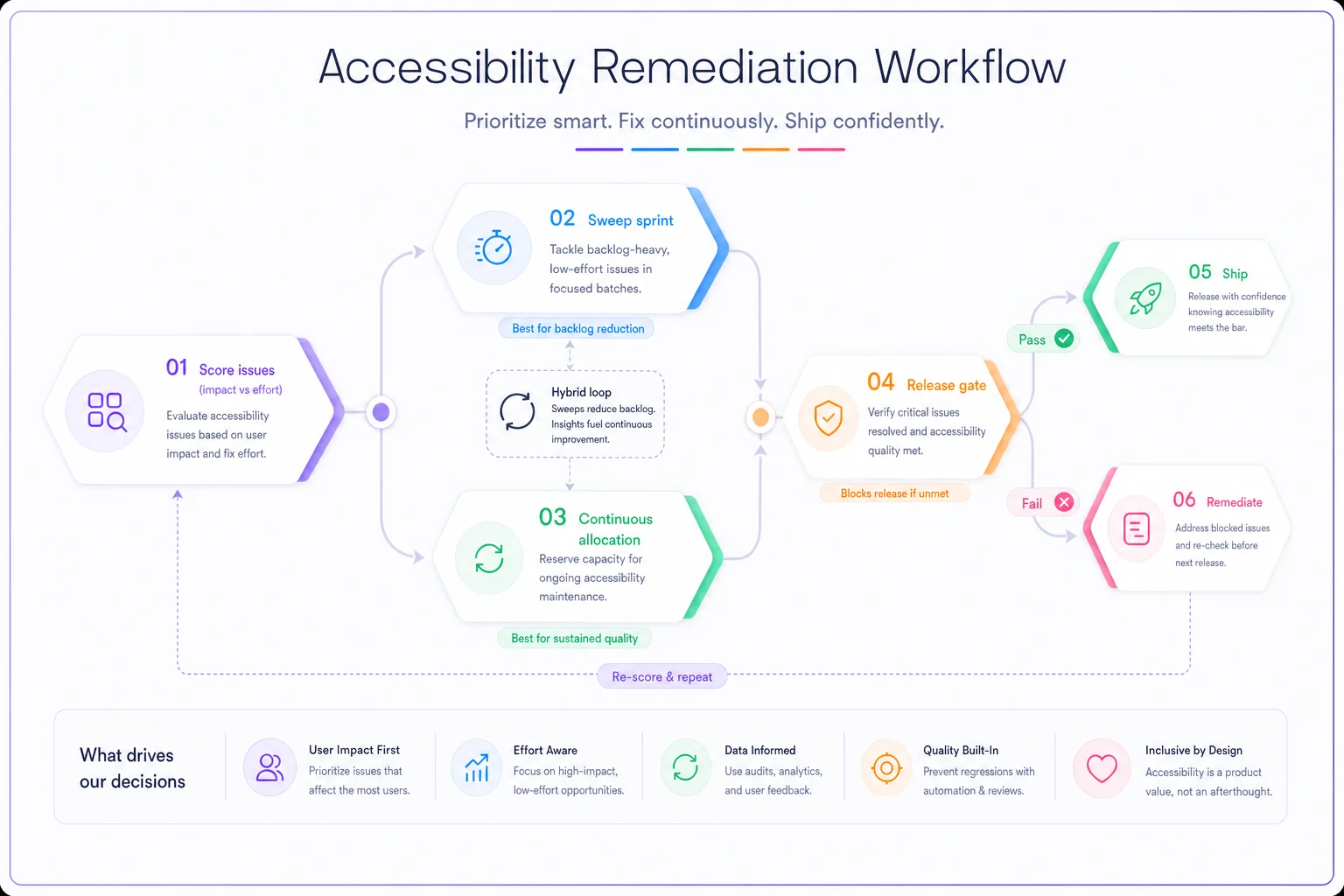
The failure mode with pure sweeps is that they're a one-time event. You do your big accessibility sprint, everyone celebrates, and then six months of feature work reintroduces half the problems you just fixed because nobody's checking new components. The failure mode with pure continuous is that the two tickets per sprint are the first thing dropped when a launch date slips. Both patterns leak. The hybrid, with the gating rules below, is what actually holds.
Gating rules: which fixes block a release
Scoring and scheduling still don't answer the hardest question: what happens when a release is ready to ship but there's a known accessibility issue in it?
Without a rule, this gets decided emotionally in a Slack thread at 4pm on a Friday, and the answer is almost always "ship it, we'll fix it next sprint." Then next sprint has its own fire.
You need gating rules written down before the pressure hits. Tie the gate to the impact score, not to whether someone happens to notice.
-
Blocker gate. Any high-impact issue on a critical user path — checkout, signup, login, core task completion, anything on a legally-scoped flow — blocks the release. No exceptions granted by the engineer or PM alone; an exception requires sign-off from a named owner (usually the product lead plus whoever owns compliance).
-
Conditional gate. High-impact issues on non-critical paths, or medium-impact on critical paths, can ship only with a committed fix ticket scheduled in the next sprint and a documented reason. No scheduled fix means it's treated as a blocker.
-
Log gate. Low-impact issues ship freely but must be logged in the tracked backlog with a score. They never silently disappear; they roll into the next sweep.
The part most teams miss: the gate has to be enforced by something other than goodwill. If the only thing stopping a release is a PM remembering to check, it will get skipped under deadline pressure. Wire the blocker check into your definition of done and your release checklist so it's a required step, the same way you'd gate on a failing test suite. When gating is a coordinated cross-team step rather than one person's judgment call, releases stop being a negotiation — the cross-team launch orchestration approach applies directly here, because accessibility gates usually span design, engineering, and QA.
When strict gating is a bad idea
Gating everything hard sounds responsible, but for an early-stage product with three users and no compliance obligations, blocking releases on every high-impact issue will grind you to a halt and breed resentment. In that situation, use the log gate broadly and reserve blockers for genuine legal exposure. Match the strictness to your actual risk — a healthcare or government-facing product needs hard gates from day one; an internal tool used by a dozen people does not.
Acceptance criteria PMs can actually verify
The last gap is the sneakiest. A ticket says "fix keyboard navigation on the modal." An engineer adds a tabindex, closes the ticket, and it looks done. Nobody actually tabbed through it with a screen reader. Three weeks later it's back in the audit.
Accessibility acceptance criteria have to be verifiable by someone who isn't the person who wrote the code. Vague criteria are why remediation work reopens endlessly.
Good acceptance criteria for a WCAG fix look like this:
-
Specific behavior stated. Not "make it accessible" but "all interactive elements in the modal are reachable and operable by keyboard alone, in a logical order, and focus is trapped inside the modal until it's closed."
-
A named test method. Which tool or manual check confirms it — keyboard-only walkthrough, screen reader (specify NVDA/VoiceOver), automated axe scan showing zero violations on that component.
-
The success criterion referenced. Tie it to the WCAG criterion (e.g. 2.1.1 Keyboard) so there's no ambiguity about what "passing" means.
-
A sign-off owner who isn't the implementer. QA or a designated accessibility reviewer confirms, not the engineer who did the work.
A checklist a PM can drop into a ticket template:
-
[ ] Issue linked to a specific WCAG success criterion
-
[ ] Impact and effort scores recorded
-
[ ] Expected behavior described in plain, testable language
-
[ ] Test method named (automated scan / keyboard walkthrough / screen reader)
-
[ ] Verified by someone other than the implementer
-
[ ] Regression check added so a future component change re-flags it
-
[ ] Result logged against the audit tracker so the burndown reflects reality
That last point — regression checks — is what separates teams that fix accessibility once from teams that stay fixed. If your date-picker passed and then someone refactored it two months later, you want that to surface automatically, not in next year's audit.
A real scenario
A team running a mid-market scheduling product for clinics got an audit back with around 310 findings ahead of a procurement deadline — a hospital system wouldn't sign without a clean VPAT on the core booking flow.
They'd been treating the backlog as one undifferentiated block and had made almost no progress in two months. Every planning session ended with "it's too big, let's do it later." Once they scored everything on the impact/effort heatmap, the picture shifted pretty quickly. About 200 findings were low-impact issues buried in admin and reporting screens the procurement team would never touch. Only roughly 30 were high-impact issues sitting directly on the booking and confirmation flow that actually mattered for the deal.
They ran a single focused sweep sprint on those 30, plus a handful of low-effort quick wins on the same pages. Blockers were gated hard: nothing in the booking flow shipped with an open high-impact issue. Everything else went to the log gate. The booking flow was clean in about three weeks — well before the flat list would have even been triaged — and the remaining low-impact work moved to a continuous 15%-per-sprint allocation.
The deal closed. More importantly, the continuous allocation and regression checks meant that six months later the booking flow was still passing, instead of quietly rotting back to where it started.
Bringing it together
The reason accessibility work stalls almost never comes down to teams not caring. It comes down to a 380-line list that can't be planned, no rule about what actually blocks a release, and acceptance criteria loose enough that fixes reopen forever.
Score everything on impact versus effort so you attack the 25 findings that matter before the 200 that don't. Use a sweep to knock down the initial pile, then go continuous so it stays down. Write gating rules before the deadline pressure arrives, and enforce them through your definition of done rather than someone's memory. Make every fix verifiable by a second person with a named test method, so "done" actually means done.
That's the whole roadmap — not a document that impresses an auditor, but a sequence your team can actually execute against.
Ready to elevate your product management?
Join 2,000+ product teams using Itemyly to accelerate delivery, improve alignment, and build better products.