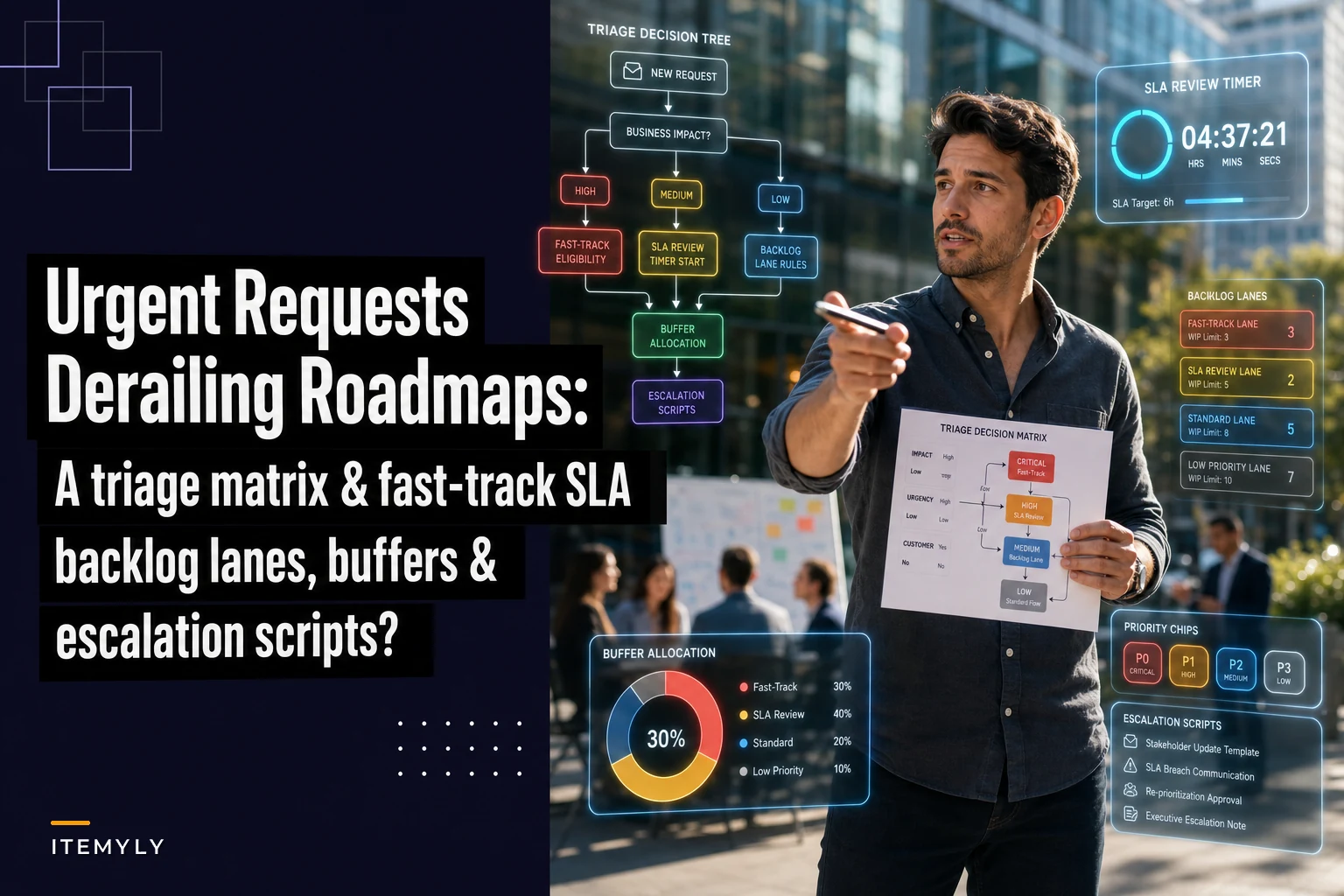

Urgent requests keep derailing roadmaps? A triage matrix, fast-track SLA and escalation scripts

Urgent requests keep derailing roadmaps? A triage matrix, fast-track SLA and escalation scripts

Stop letting "urgent" requests blow up your quarterly plans with disciplined triage patterns for product teams

Your roadmap says you'll ship the new billing engine next quarter. Engineering blocked two sprints for it. Design finished mockups three weeks ago. Then Monday hits and suddenly the CEO forwards an email about a competitor feature, sales escalates a deal-blocking request, and support flags a bug affecting exactly one enterprise customer who "might churn."

By Thursday, half your team is working on these "urgent" items. The billing engine gets pushed. Again.

This isn't about saying no to everything. Some urgent requests genuinely need immediate attention — a payment processor going down affects every customer, not just one vocal enterprise account. The problem is most product teams treat all urgent requests the same way, and eventually the roadmap just becomes a suggestion box.

The hidden cost of reactive product management

Every time an urgent request derails planned work, you pay compound interest on that decision. The obvious cost is whatever you planned doesn't ship. But the real damage runs deeper.

Engineering starts treating roadmap items as optional. Why invest mental energy understanding the billing engine architecture when there's a 40% chance they'll get pulled onto something else next week? They start working defensively — picking smaller tickets, avoiding complex refactors, keeping things loosely coupled because context switches are coming.

Planning gets worse each quarter too. You spend three days carefully sequencing dependencies, then throw it out when the first urgent request lands. Teams start padding estimates because interruptions are inevitable. Velocity metrics stop meaning anything when half the work wasn't planned.

Product-market fit conversations shift from strategic bets to tactical reactions. Instead of deliberately building toward a coherent vision, you're assembling a patchwork of features based on whoever screamed loudest that week. Marketing can't plan campaigns when they don't know what will actually ship. Sales can't confidently position upcoming features. Customer success can't prepare documentation. The whole go-to-market motion becomes reactive because product delivery is unpredictable.

Why urgency inflation happens in every growing product org

The transition usually happens somewhere around 50-75 employees. Before that, everyone knows the real priorities because you're all in the same room. The CEO can literally turn their chair and ask if something is truly urgent.

Once you pass that threshold, communication layers multiply. A customer complaint reaches support, who escalates to their manager, who brings it to a cross-functional meeting, who escalates to product. By the time it reaches you, "customer mentioned this would be nice" has morphed into "enterprise customer threatening to churn immediately."

Sales organizations naturally create urgency inflation. Every deal in the pipeline is always two features away from closing. The $500K deal needs SSO. The expansion opportunity requires advanced reporting. The competitive displacement depends on that one workflow feature. Sales comp rewards closing deals this quarter, not preserving product strategy for next year.

Support faces different pressure. When a customer is angry on a call, everything feels urgent to the rep trying to help them. They don't see the 10,000 customers using the product successfully — they see the one person frustrated right now. Their metrics often emphasize resolution speed and satisfaction scores, which creates an incentive to escalate anything that might move the needle.

Executive requests carry implicit urgency regardless of actual importance. When the CEO forwards a competitor's feature announcement with "thoughts?" it triggers a cascade of reactive planning. Nobody wants to be the PM who ignored the CEO's email, even when the CEO just wanted visibility, not immediate action.

A decision-tree triage matrix that actually gets followed

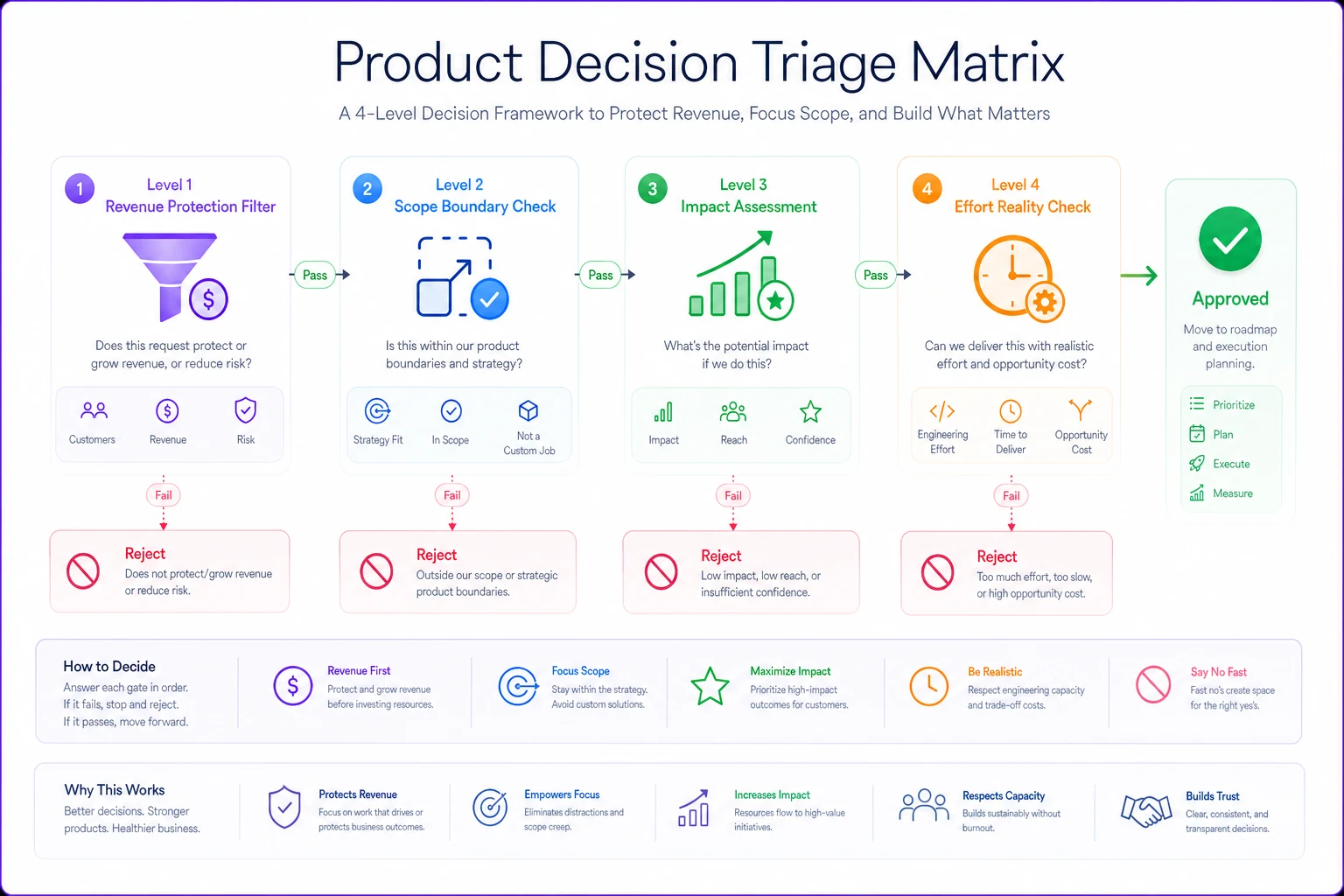
Stop evaluating urgency in isolation. Every urgent request should flow through a consistent decision tree that separates genuine fires from false alarms.

Level 1: Revenue Protection Filter

Start with quantifiable revenue impact. Is this request directly tied to preventing churn or closing deals? Not hypothetically — actually. Get specific numbers. Which customers, what revenue amount, and get it in writing from sales or customer success.

If a sales rep claims a deal depends on a feature, they document it in your CRM: deal size, close probability, specific feature requirement, and timeline. No documentation means it goes to the standard backlog. This sounds harsh, but watch how quickly "urgent" requests disappear when people have to actually document their claims.

Level 2: Scope Boundary Check

Can this be solved without product changes? Roughly 60% of "urgent" product requests are actually process, documentation, or configuration issues. That enterprise customer who needs custom fields might just need someone to show them how to use tags properly. The integration request might be solvable through Zapier or your existing API.

Build a quick-check list with your solutions team: Can support handle this through configuration? Can customer success create a workaround? Can professional services deliver a custom solution? Only after exhausting those options does it become a product request.

Level 3: Impact Assessment

If it passes the first two filters, assess blast radius. How many customers are actually affected today — not potentially affected. A bug hitting 1% of users sounds small until you realize it's breaking checkout for everyone on mobile Safari.

  1. Critical

    Affects >30% of active users or >$500K monthly revenue

  2. High

    Affects 10-30% of users or $100-500K monthly revenue

  3. Medium

    Affects 5-10% of users or $50-100K monthly revenue

  4. Low

    Everything else

Level 4: Effort Reality Check

That "quick fix" the CEO wants? Get an actual estimate from engineering. Not a guess, not a "probably a day or two" — a real technical assessment. Include regression testing, deployment, documentation, and the cost of context switching.

Most "urgent" requests die here when stakeholders realize their one-day fix is actually a two-week project that delays three other features.

Here's a simple diagram of the triage flow.

Process diagram

The diagram maps inputs to decisions so anyone can follow the same steps during intake.

Fast-track eligibility that prevents everything becoming urgent

Not everything needs to go through quarterly planning, but you need strict criteria for what qualifies as fast-track. Otherwise fast-track becomes the default path and planning becomes meaningless.

Security and Compliance Triggers

  1. Security vulnerabilities with CVE score >7.0
  2. Compliance violations that risk certification
  3. Data privacy issues with regulatory implications
  4. Authentication or authorization failures

No debate, no committee. These jump the queue immediately.

Revenue Protection Threshold

Set a specific monthly revenue number that triggers fast-track. For most B2B SaaS companies, this sits around 5-8% of MRR. If fixing an issue prevents losing more than that threshold in the next 30 days, it qualifies.

Require written confirmation from the account owner when invoking the revenue protection threshold to prevent speculative fast-tracks.

The discipline here matters: require written confirmation from the account owner, not just sales speculation. Get the customer on record saying "we will churn if this isn't fixed by [date]." It's remarkable how many urgent requests become less urgent when you need actual customer confirmation.

Operational Breakdown Scenarios

  1. Payment processing failures
  2. Core workflow blockers — can't create or edit primary objects
  3. Data corruption or loss
  4. Integration failures affecting more than 20% of customers

These get fast-tracked, but with a catch: the requesting team must provide a customer workaround while the fix is built. This prevents teams from crying wolf when a manual process could handle things temporarily.

Service level agreements that teams actually meet

SLAs without enforcement are just wishes. Most product teams create elaborate SLA structures then ignore them the moment someone important complains.

Triage Response Times (not resolution)

PriorityFirst ResponseResolution Plan
Critical2 hours8 hours
High8 hours24 hours
Medium2 days5 days
LowStandard backlog processing

These are response times, not fix times. You're committing to evaluate and plan, not drop everything and build. That distinction is what keeps SLAs from destroying your roadmap.

Escalation Cost Structure

Want to jump the queue? Pay for it — not with money, but with allocation. If sales wants to fast-track a feature, they give up their next quarterly request slot. If support needs an urgent fix, it counts against their annual enhancement budget.

This creates real trade-offs. Teams stop treating everything as urgent when they realize urgent requests consume future allocation.

Violation Consequences

SLAs need consequences on both sides. If product misses an SLA response time, the request automatically escalates to VP level. But if the requesting team marks something as critical that doesn't meet the criteria, they lose fast-track privileges for 30 days.

One B2B company had sales marking everything as critical until they implemented a "boy who cried wolf" policy. After three false critical escalations, that sales rep's requests all went to standard backlog for a quarter. Urgent requests dropped roughly 70% within two weeks.

Sample backlog lanes and buffer allocation

Your backlog needs explicit lanes with protected capacity. Without this structure, urgent requests consume 100% of capacity by default.

The Three-Lane System

  1. Lane 1

    Committed Roadmap (60% capacity) Strategic work. The features you planned, the technical debt you're paying down, the platform improvements you need. Teams know that three out of five days each week go here, no matter what else is happening.

  2. Lane 2

    Fast-Track Buffer (25% capacity) Pre-allocated time for urgent requests that meet your criteria. This isn't overflow capacity — it's planned buffer. Having it means urgent requests don't automatically destroy roadmap items. They consume buffer first.

  3. Lane 3

    Operational Overhead (15% capacity) Bug fixes, small improvements, developer experience, monitoring. The unglamorous work that keeps the lights on. Teams often pretend this work doesn't exist, then wonder why velocity drops when developers spend 20% of their time on unplanned operational tasks.

Weekly Capacity Allocation

  1. 6 continue roadmap work
  2. 2-3 handle fast-track items
  3. 1-2 manage operational tasks

Rotate these assignments weekly so nobody gets stuck in fast-track hell permanently. The developers on roadmap work are protected — no pulling them mid-sprint unless you hit a true critical issue that meets your documented criteria.

Quarterly True-Up Process

Every quarter, analyze where capacity actually went versus your planned allocation. If fast-track consistently consumes 40% instead of 25%, you either need to fix your triage criteria or adjust your allocation.

Most teams discover they're spending 40-50% on "urgent" requests without realizing it. Making this visible often triggers the organizational conversation about whether you're building a product or running a custom development shop.

Escalation scripts that preserve relationships while enforcing discipline

The hardest part isn't creating triage criteria — it's enforcing them when the VP of Sales is standing at your desk. You need exact scripts that acknowledge concerns while maintaining boundaries.

For Sales Escalations:

"I understand this deal is important. Let me work through our impact assessment with you. First, can you document the specific customer requirement and revenue impact in Salesforce? I need that for our fast-track review. Based on what you're describing, this might qualify for our Q2 roadmap if it doesn't meet fast-track criteria. The alternative is using one of your team's fast-track tokens, which would prioritize this but reduce your allocation for next quarter. Which would you prefer? If the customer needs this sooner, could we explore a professional services engagement to build a custom solution while we evaluate for the product roadmap?"

For Executive Requests:

"I see why this is concerning. Let me run this through our triage matrix to understand the impact. Could you help me understand the specific outcome you're looking for — is this about competitive positioning, customer satisfaction, or revenue protection? Based on our criteria, this would be classified as [Medium/Low]. We can add it to the roadmap for next quarter, or if it's truly urgent, we'd need to delay [specific feature] to accommodate it. Should I prepare an impact analysis of what we'd need to push?"

For Support Escalations:

"I hear that the customer is frustrated. Let's first check if there's a workaround we can provide while we evaluate the product fix. Can your team handle this through configuration or manual process temporarily? Looking at the impact, this affects [X] customers representing [Y] revenue. That puts it in our [High/Medium/Low] category with an SLA of [timeframe]. I'll have a resolution plan by [date] and we can discuss whether it qualifies for fast-track. If the customer situation is truly critical, we need written confirmation that they'll churn without this fix. Can you get that documentation?"

The before and after: from reactive chaos to predictable delivery

A typical mid-sized SaaS company operating in constant crisis mode might look something like this over a single quarter:

MetricBefore TriageAfter Triage
Planned features88
Planned features delivered36
Urgent requests handled114
Engineering satisfaction4/107/10
Roadmap predictability35%75%

Total output didn't dramatically change — they still shipped roughly 10 things. But 60% of that work aligned with strategic goals instead of 27%. Engineering morale improved because developers spent most of their time on meaningful work. Sales learned to be selective with escalations once they realized tokens were finite.

The real shift happens in planning confidence. When marketing knows 75% of the roadmap will actually ship, they can plan campaigns. When sales knows what's actually coming, they can position accurately. When engineering knows they'll get to work on what was planned, they invest in better architecture rather than working defensively. That flywheel is worth more than any individual feature you might have fast-tracked.

Tools and automation that enforce discipline

Triage discipline fails when it depends on human enforcement every time. The PM who manually rejects every urgent request becomes the villain. Build systematic enforcement through your existing tools instead.

Your ticketing system should automatically classify requests based on your triage matrix. When someone creates a ticket, required fields capture: number of affected customers, revenue impact, workaround availability, and business justification. The system auto-assigns priority based on those inputs, removing subjective judgment from the equation.

Set up escalation workflows that enforce documentation requirements. If sales marks something as critical, the system automatically creates a Salesforce task requiring deal documentation within 24 hours. No documentation? The ticket auto-downgrades to medium priority.

Create dashboards that show fast-track consumption in real-time. When sales has used 2 of their 3 quarterly fast-track tokens, everyone can see it. This transparency prevents surprise when the next request gets rejected.

Weekly reports should compare planned versus actual capacity allocation. If fast-track consumed 40% instead of 25%, that triggers an automatic review. These patterns become visible before they become problems.

AI-powered operational software can take a lot of the manual weight off here. Instead of PMs reviewing every incoming request, the platform can pre-filter based on your triage criteria, automatically prompt for required documentation, and surface historical workarounds that might resolve the issue without any product changes. It also means triage decisions are applied consistently — not shaped by whoever is having a rough day or doesn't feel like pushing back. Over time, these platforms can track which teams repeatedly violate triage criteria and adjust their submission flow accordingly, which creates the kind of natural feedback loop that actually changes behavior.

For more on building structured intake processes, see: Fix noisy customer feedback: a repeatable intake and filtering rubric.

Making triage patterns stick in your organization

The first month will be rough. Every stakeholder who's used to getting their way through escalation will test your boundaries. Sales will claim deals are dying. Support will insist customers are furious. Executives will "just this once" try to bypass the process.

Hold the line for 30 days. That's usually enough time for one planning cycle where teams see real benefits. Engineers ship what they planned. Product metrics improve because you're building coherent features instead of random fixes. The organization starts to trust that the roadmap means something.

Some urgent requests are genuinely urgent — that's exactly why you have fast-track lanes. But most are just loud. Implementing clear triage patterns is how you stop being a reactive feature factory and start being a product organization that can actually deliver on its vision.

The irony is that teams often ship faster when they stop reacting to everything. Context switching is probably the biggest productivity killer in product development, more damaging than most technical challenges. When engineers can focus on planned work for 60% of their time instead of 20%, velocity improves even with less total capacity available.

If roadmap dependency management is also a challenge, this is worth reading: Ignoring roadmap dependencies costs launches: practical mapping formats.

Your roadmap shouldn't be fiction. Your team shouldn't live in constant crisis. And "urgent" shouldn't mean "whoever complained loudest." The goal isn't to say no to everything — it's to make conscious, documented trade-offs where urgent requests compete fairly with planned work. When everyone understands the rules and sees them consistently applied, the volume of urgent requests naturally decreases, and your product development becomes predictable, strategic, and a lot more impactful.

Built for Product Teams Designed specifically for product managers and agile workflows
Save Time Streamline roadmapping, prioritization & release planning
Increase Transparency Keep stakeholders informed with real-time updates
Drive Growth Focus on impact-driven features and customer value