


Product teams track everything except the one thing that actually blocks releases. Feature completion rates, velocity charts, burndown metrics — none of these matter when your payment integration team is three sprints behind the checkout flow that depends on it.
Dependencies kill more product launches than bad code ever will
The worst part usually hits around month four of what should have been a two-month project. Engineering finally surfaces that the notification service your main feature depends on won't be ready for another six weeks. The API team mentions they've been waiting on a security review that nobody scheduled. Your carefully planned Q3 launch becomes a Q1 maybe.
This isn't a niche problem. A fintech startup building a new lending product discovers their risk scoring module needs data from a compliance system still in design. An e-commerce platform realizes their personalization engine requires customer data their legacy system can't provide. A healthcare app learns their appointment booking feature needs integration with three different calendar systems — all on separate timelines.
Same story, different industry, every time.
Why dependency tracking stays broken despite all our planning tools
Most teams treat dependencies like footnotes instead of critical path blockers. During planning, someone mentions "we'll need the auth service updated" and everyone nods. Three months later, that offhand comment is the reason everything stops.
Eliminate product chaos and align your team.
Itemyly helps you plan, prioritize, and track every product milestone seamlessly.
- Centralized roadmap management
- Stakeholder collaboration
- Release tracking & analytics
No credit card required
The structural problem runs deeper than poor documentation. Product managers plan features in isolation, assuming other teams will align. Engineering estimates work without checking if upstream services are ready. Leadership sets dates based on best-case scenarios where every dependency resolves cleanly.
What actually unfolds looks more like organizational chaos. The mobile team builds assuming the API will have certain endpoints. The API team designs assuming the database schema won't change. The database team migrates assuming nobody needs the old structure anymore. Each assumption becomes a blocker that only surfaces after significant work is already done.
Traditional project management tools make this worse. Gantt charts show tasks but hide dependencies between teams. Kanban boards track progress within a team but miss cross-team blockers. Roadmap software displays clean timelines but can't surface when an authentication service delay will cascade into three other features missing their launch dates.
Three dependency mapping formats that actually work
After watching hundreds of product launches stumble on hidden dependencies, clear patterns emerge about which tracking methods prevent disasters versus which ones just document them after they happen.
The Dependency Matrix: seeing all connections at once
A dependency matrix puts every feature or component on both axes of a grid. Each intersection shows the relationship between items. This format is especially good at revealing hidden connections that linear planning misses completely.
Here's what a real dependency matrix looks like for a typical e-commerce checkout rebuild:
| Depends On → | Payment Gateway | User Auth | Inventory API | Tax Calculator | Email Service | Shipping Module |
|---|---|---|---|---|---|---|
| Cart System | Validates cards | Gets user data | Checks stock | - | - | Calculates rates |
| Order Processing | Charges payment | Verifies user | Reserves items | Applies tax | Sends confirmation | Books shipment |
| Refund Flow | Reverses charge | Checks permissions | Returns stock | Recalculates | Notifies customer | Cancels shipment |
| Admin Dashboard | Views transactions | User lookup | Stock reports | Tax reports | Email logs | Tracking data |
The matrix immediately exposes that Order Processing touches every single system — making it the highest-risk feature to schedule. It also shows that the Email Service, while seeming minor, blocks three different features from completing.
Teams using matrices catch dependency loops before they become problems. When the payment team wants to update their API, the matrix shows exactly which features need coordination. When planning sprints, you can see which items can progress independently versus which need sequencing.
Once you've built the matrix, the next step is understanding how delays actually travel through your system — which is where graphs become useful.
The Dependency Graph: understanding cascade effects
Dependency graphs work differently — they show directional relationships and help visualize how delays spread through your roadmap. Each node represents a feature or component, with arrows showing what depends on what.
A subscription platform rebuilding their billing system might map dependencies like this:
Core components:
-
Legacy Billing System (current state)
-
New Payment Processor Integration
-
Customer Database Migration
-
Subscription Management Service
-
Invoice Generation Module
-
Dunning Process Handler
Connections between them:
-
New Payment Processor requires Customer Database Migration
-
Subscription Management requires New Payment Processor
-
Invoice Generation requires Subscription Management
-
Dunning Process requires Invoice Generation
-
Customer Portal requires Subscription Management
-
Admin Tools requires all modules
Visualize this flow to spot how delays cascade.
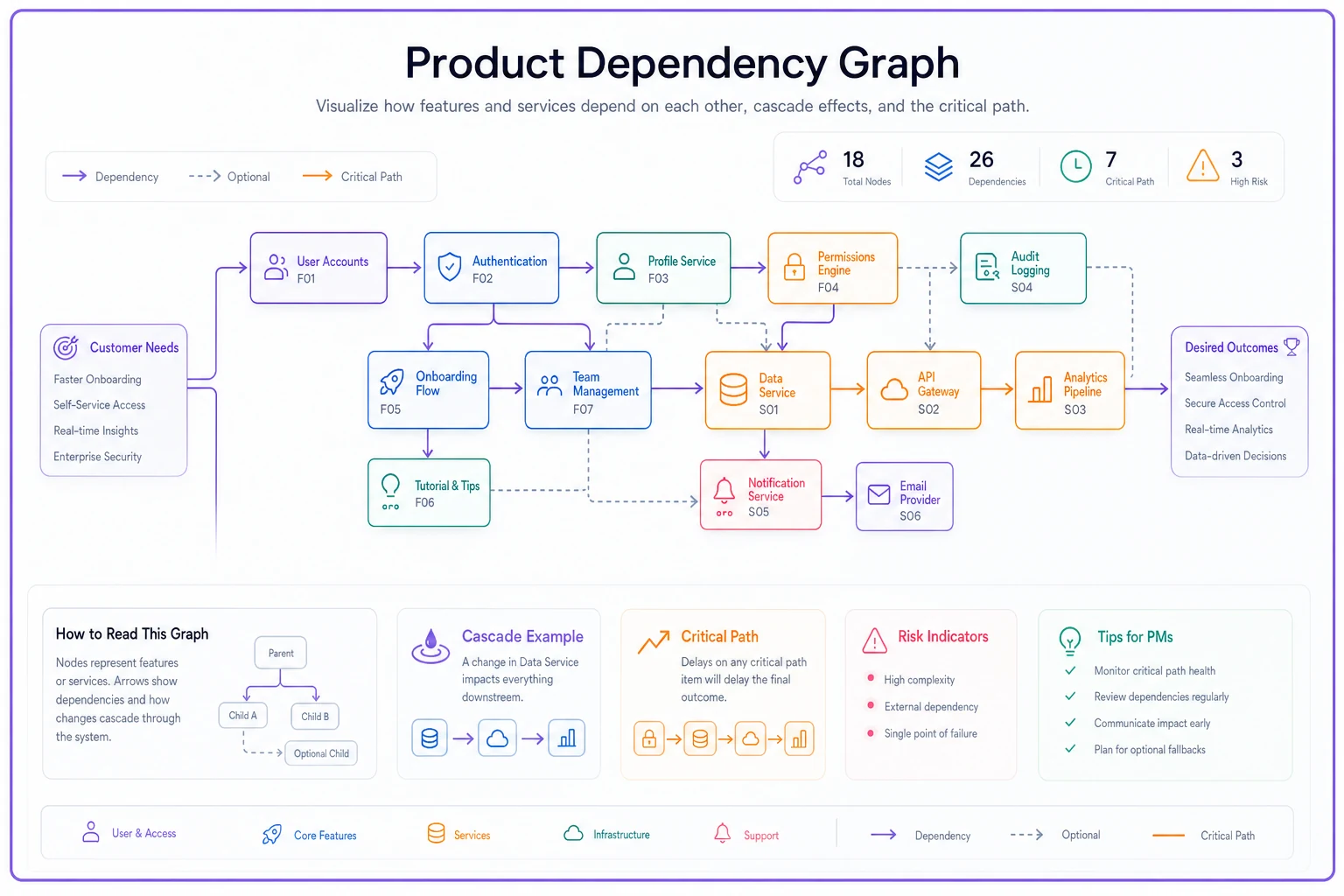
This immediately shows that delaying the Customer Database Migration cascades through five other components. It also reveals that the Customer Portal and Admin Tools can't even start meaningful work until Subscription Management completes.
Graph formats excel at finding critical paths. By following the longest chain of dependencies, you identify which items determine your actual ship date. They also highlight opportunities for parallel work — components with no connecting arrows can progress simultaneously.
The Dependency Register: detailed tracking for complex projects
While matrices show connections and graphs show flow, registers capture the messy details of real-world dependencies. Think of it as the operational handbook for managing complex relationships.
Dependency ID: DEP-001 Feature Requiring: Mobile Checkout Flow Depends On: Payment Gateway API v2 Owner: Sarah Chen (Mobile Team) Provider: James Wu (Platform Team) Type: Technical Integration Status: Blocked Required By: March 15 Current State: API endpoints defined but not implemented Impact if Delayed: Mobile release pushes to next cycle, ~$200k revenue impact Mitigation Options: Use v1 API with limitations, ship web-only first Notes: Security review required before v2 can be exposed externally
The register captures context that matrices and graphs miss. Who exactly needs to talk to whom? What happens if this specific dependency slips? What workarounds exist? Real product teams maintain registers in spreadsheets, updating them weekly during dependency review meetings. Each line gets discussed: status changes, new blockers, mitigation plans. This granular tracking catches problems while there's still time to adjust.
Prioritization rules that prevent cascade failures
Not all dependencies matter equally. A login service delay might block everything, while a reporting dashboard delay affects only internal tools. Understanding which to resolve first prevents small delays from becoming launch failures.
The Critical Path Method (simplified for product teams)
Forget the complex project management theory. In practice, critical path for product teams means finding the longest chain of dependent work that determines your ship date.
Start with your launch date and work backwards:
-
What must be complete to launch?
-
What must be complete for those items to start?
-
Keep tracing back until you hit items with no dependencies.
The longest chain is your critical path. Any delay on this path delays launch. Everything else has buffer time.
A marketplace platform launching seller analytics discovered their critical path like this: the Analytics Dashboard takes 2 weeks, but depends on a Data Pipeline that takes 3 weeks, which depends on a Transaction Database Schema Update taking 1 week, which depends on a Legacy Data Migration Script taking 2 weeks. Total critical path: 8 weeks. Even though the dashboard only takes 2 weeks to build, it can't launch for 8 weeks. Meanwhile, the email notification system (4 weeks) can slip a month without affecting launch because it's not on the critical path.
Risk-Impact Scoring for dependency prioritization
Beyond critical path, score each dependency by risk and impact to focus effort where it matters most.
Risk factors to consider: team reliability (has this team delivered on time before?), technical uncertainty (new technology vs. proven solutions), external dependencies (third-party APIs, vendor deliveries), and resource availability (team capacity, competing priorities).
Impact factors to evaluate: number of features blocked, revenue implications, customer commitments, and strategic importance.
Score each factor from 1 to 5, multiply risk × impact. Anything scoring above 15 needs active mitigation.
| Dependency | Risk Score | Impact Score | Total | Priority |
|---|---|---|---|---|
| KYC Service Integration | 4 | 5 | 20 | Critical |
| Statement Generator | 2 | 3 | 6 | Monitor |
| Push Notifications | 3 | 2 | 6 | Monitor |
| Admin Portal Updates | 1 | 2 | 2 | Low |
The KYC service scored critical because it involves a third-party vendor (high risk) and blocks all customer onboarding (high impact). That dependency gets daily attention, backup plans, and escalation paths.
The Two-Week Rule for dependency resolution
Any dependency not resolved within two weeks of identification needs escalation and mitigation planning. Full stop.
Dependencies that linger longer than a sprint get normalized. Teams start working around them instead of resolving them. Technical debt accumulates. The eventual resolution becomes more complex because multiple workarounds now depend on the broken state.
-
Escalate to leadership on both sides of the dependency.
-
Document specific blockers preventing resolution.
-
Create a mitigation plan if resolution will take longer.
-
Set a hard deadline for either resolution or an official workaround.
This forces decisions instead of letting dependencies quietly drift into permanent blockers.
Mitigation patterns that keep products shipping
Even with solid tracking, dependencies will slip. The difference between teams that ship and teams that miss is how they handle blocked work.
The Stub and Switch Pattern
Instead of waiting for complete dependencies, build against stubbed interfaces that return hard-coded responses. This lets development continue while real implementations catch up.
A food delivery app needed a restaurant recommendation engine that wouldn't be ready for months. Instead of blocking the entire homepage redesign, they:
-
Defined the API contract (what data they'd eventually receive).
-
Built a stub service returning hard-coded restaurant lists.
-
Developed the full UI against the stub.
-
Switched to the real service when ready.
The app shipped on time with basic recommendations, then enhanced them when the ML-powered engine was complete. Customers got value immediately instead of waiting for perfection.
The Progressive Enhancement Approach
Ship core functionality first, then layer on features as dependencies resolve. This requires designing your product to gracefully degrade when certain services aren't available.
An expense tracking app planned three features: manual expense entry (no dependencies), receipt OCR scanning (depends on ML service), and automatic credit card import (depends on banking API integration). Instead of waiting for all three, they shipped manual entry immediately. Users could start tracking expenses while the team worked on OCR. Six weeks later, scanning went live. Credit card import came three months after that. Each enhancement made the product better, but users got value from day one.
The Circuit Breaker Method
Build fallback behaviors for when dependencies fail or aren't ready. Your application checks if a service is available and automatically switches to backup behavior when it's not.
-
Primary
Real-time pricing from airline APIs.
-
Fallback 1
Cached prices from the last 24 hours.
-
Fallback 2
Estimated prices based on route and date.
-
Final fallback
"Call for pricing" message.
When their main pricing provider had a three-week delay updating to new airline contracts, the platform kept running on cached prices. Bookings continued, customers stayed happy, and the team had breathing room to fix the integration properly.
The Parallel Track Strategy
When critical dependencies block your main approach, run parallel development tracks exploring alternatives. This costs more upfront but prevents single points of failure from destroying timelines.
-
Track A
Full hospital system integration (complex, uncertain timeline).
-
Track B
Standalone scheduling with manual sync (simpler, faster to ship).
Track B launched in 6 weeks, giving clinics basic scheduling immediately. Track A took 4 months but eventually replaced the simple version. The parallel investment prevented a 4-month delay in getting anything into users' hands at all.
Automation opportunities in dependency management
Manual dependency tracking breaks down as products scale. A ten-person team might manage with spreadsheets, but a fifty-person organization needs systematic tracking that surfaces problems automatically.
Automated dependency detection
Modern development workflows create natural checkpoints for discovering dependencies. Code imports, API calls, database queries — these technical connections reveal organizational dependencies that never make it into planning docs.
Static analysis tools scan codebases to find which services call which APIs, which database tables are accessed by different components, configuration dependencies between systems, and library and package relationships.
A payment platform discovered their checkout flow touched 47 different internal services through automated scanning. Manual tracking had identified only 12. The missing dependencies explained why checkout updates consistently took three times longer than estimated.
Smart alerting for cascade risks
-
Timeline shifts
When a dependency's estimated completion date moves, alert all dependent teams automatically.
-
Risk accumulation
When multiple dependencies for the same feature show yellow or red status, escalate to product leadership.
-
Critical path changes
When delays push a dependency onto the critical path, trigger immediate review.
-
Cross-team patterns
When one team becomes a blocker for multiple features, surface capacity or prioritization issues.
These alerts transform dependency management from a weekly review meeting into real-time risk management. Problems surface while there's still time to adjust plans or implement mitigations.
Integration with existing tools
Dependency tracking shouldn't require learning new tools. The most successful automation approaches plug into what teams already use — pulling dependency data from Jira links between tickets, GitHub repository dependencies, Slack conversations about blockers, calendar schedules for related teams, and API documentation systems.
That data then gets pushed to sprint planning tools, roadmap visualizations, risk dashboards, daily standup notes, and executive status reports.
This means dependency tracking happens as a natural part of work, not as an additional burden. Teams update their normal tools, and dependency intelligence flows automatically to those who need it.
Templates that make dependency tracking operational
Theory matters less than having templates your team will actually use.
Weekly Dependency Review Template
Meeting: Weekly Dependency Sync Duration: 30 minutes Attendees: Product leads, Tech leads, Affected team representatives
Agenda Structure:
-
Red Dependencies (10 minutes) — What's blocking launches? Who owns resolution? What's the mitigation plan?
-
New Dependencies (5 minutes) — What dependencies were discovered this week? Initial risk assessment. Owner assignment.
-
Resolved Dependencies (2 minutes) — What unblocked this week? Any lessons learned?
-
Upcoming Risks (8 minutes) — Dependencies at risk next sprint. Preemptive mitigation options.
-
Action Items (5 minutes) — Specific owner, due date, success criteria.
The meeting only works if someone actually owns follow-through. Assign a dependency coordinator — even rotating the role works — so items don't fall through the cracks between sessions.
Dependency Risk Register Spreadsheet
| ID | Feature | Depends On | Risk | Impact | Score | Status | Owner | Due Date | Mitigation | Notes |
|---|---|---|---|---|---|---|---|---|---|---|
| D001 | Mobile Payments | Gateway v2 API | 4 | 5 | 20 | 🔴 Red | S. Chen | Mar 15 | Use v1 with limits | Security review pending |
| D002 | Analytics | Data Pipeline | 3 | 3 | 9 | 🟡 Yellow | K. Patel | Mar 22 | Manual reports | Team short-staffed |
| D003 | Notifications | Email Service | 1 | 2 | 2 | 🟢 Green | J. Kim | Mar 8 | None needed | On track |
Column Definitions:
-
Risk
1–5 (1=low, 5=high probability of delay)
-
Impact
1–5 (1=minor, 5=blocks launch)
-
Score
Risk × Impact
-
Status
Red (>15), Yellow (8–15), Green (<8)
Dependency Communication Template
-
Subject
Dependency Alert — [Feature Name] blocked by [Dependency]
-
Current Situation - Feature affected: [Name and description] - Blocked by: [Specific dependency] - Impact: [What can't progress] - Teams affected: [List teams waiting]
-
Timeline Impact - Original due date: [Date] - Current projection: [New date] - Revenue/Customer impact: [Specific consequences]
-
Resolution Path - Option A: [Primary solution — time/cost/risk] - Option B: [Alternative approach] - Recommendation: [Your suggested path]
-
Needs From You - Decision by: [Date] - Resources required: [What you need] - Success criteria: [How we'll know it's resolved]
Keep the register in a shared doc that anyone on the team can access. A register nobody can find gets ignored just as quickly as one that doesn't exist.
When dependency tracking makes sense vs. when it's overkill
Not every product needs elaborate dependency tracking. A five-person startup building their first MVP probably needs a whiteboard, not a complex tracking system. But certain signals indicate when formal tracking stops being optional.
You need dependency tracking when:
-
Multiple teams contribute to the same release
-
Launch dates have hard external deadlines
-
Features routinely slip due to "unexpected" blockers
-
Planning meetings regularly surface surprise dependencies
-
Your product integrates with external systems
-
Post-mortems repeatedly cite dependency issues
You're overdoing it when:
-
Updating tracking takes more time than the work itself
-
Every minor task gets logged as a dependency
-
Teams spend more time in coordination meetings than building
-
The tracking system requires dedicated staff to maintain
-
Dependencies get tracked but never reviewed or acted upon
Signs your dependency tracking is working:
-
Launches hit their dates more consistently
-
Fewer fire drills in the final sprint before release
-
Teams proactively communicate about blockers
-
Mitigation plans exist before problems become critical
-
Leadership has clear visibility into real blockers
A marketplace platform with around 40 engineers across 6 teams initially resisted formal dependency tracking as "process overhead." After three consecutive feature launches each slipped by two-plus months, they implemented a simple matrix and weekly review. Their next major release hit its target date for the first time in two years. Two hours weekly invested in dependency review saved dozens of hours of emergency replanning.
The hidden cost of ignoring dependencies until it's too late
Every delayed launch has a dependency story behind it. Sometimes it's dramatic — the authentication service nobody knew the mobile app needed. Sometimes it's death by a thousand cuts — dozens of small dependencies that each slip "just a week."
The real cost isn't just delayed features. When dependencies surprise teams late in development, the scramble to adjust destroys focus. Engineers context-switch between features as dependencies randomly unblock. Product managers lose credibility with stakeholders who expected launches that don't happen. Team morale erodes as careful planning gets undone by preventable surprises.
A B2B SaaS platform learned this after their "quick" invoice redesign stretched from 2 months to 7 months. The redesign touched their PDF generation service (owned by the platform team), customer data API (owned by the growth team), payment processing (owned by the finance team), and email templates (owned by marketing). Nobody mapped these connections upfront. Each team discovered dependencies only when their work got blocked.
The aftermath went beyond shipping late. Two key engineers burned out and left. The sales team had presold the new invoicing to enterprise clients who then churned when it didn't materialize. The CEO lost confidence in the product organization's ability to deliver. All because nobody spent two hours mapping dependencies before starting work.
Modern product development runs on interconnected systems that no single person fully understands. Features that seem independent share databases, APIs, design systems, and deployment pipelines. These hidden connections turn straightforward projects into complex integration challenges.
Turning dependency chaos into predictable delivery
Dependency management isn't about creating perfect plans that never change. It's about surfacing surprises early enough to handle them thoughtfully instead of frantically.
Start small. Pick your next feature release and spend 30 minutes mapping what it actually depends on — not just the obvious technical dependencies, but the organizational ones too. Which teams need to deliver what? What external services must be ready? What data needs to exist?
Build your first dependency matrix for just that release. Run a weekly 15-minute check on the status of each dependency. When something slips, immediately document your mitigation approach.
Most teams find their first mapped release reveals roughly 50% more dependencies than they expected. That's normal. Those dependencies existed whether you tracked them or not — now you can actually manage them instead of being surprised by them.
The path from dependency chaos to predictable delivery doesn't require complex tools or elaborate processes. It requires acknowledging that dependencies determine your actual ship date more than development velocity ever will. Once teams accept that, they stop being surprised when the "simple" feature takes three times longer than estimated. Your next launch will either be shaped by dependencies you actively manage or derailed by ones you discover too late.
Ready to elevate your product management?
Join 2,000+ product teams using Itemyly to accelerate delivery, improve alignment, and build better products.