


Most product teams drown in feedback noise. Support tickets, sales calls, user interviews, social mentions, feature requests—they pile up across Slack threads, spreadsheets, email chains, and sticky notes. The real problem isn't collecting feedback. It's converting that raw mess into actionable backlog items that actually move the needle on your metrics.
Teams that convert customer feedback to backlog items effectively follow a repeatable rubric. Teams that don't end up building features nobody uses while missing critical problems hiding in their support tickets.
The hidden cost of feedback chaos
A SaaS company I worked with last year collected feedback from 14 different channels. Customer success had their own spreadsheet. Support used Zendesk. Sales tracked requests in Salesforce. Product ran user interviews. Marketing monitored social. Engineering had their own wish list.
Each month, they'd try to synthesize everything into priorities. The product manager would spend three days copying, pasting, deduplicating, and squinting at patterns. By the time they finished, half the feedback was stale, context was gone, and the loudest customers were driving the roadmap.
They shipped 23 features that year. Usage data showed only 4 got meaningful adoption. Meanwhile, churn climbed because they'd missed a critical workflow issue mentioned 47 times across different support tickets—but nobody had connected the dots.
This isn't unusual. Most teams treat feedback intake like a suggestion box instead of a signal processing system. Without a rubric to filter noise from signal, you end up with:
Decision paralysis: Everything seems equally important when you can't quantify impact. Product managers bounce between competing priorities based on whoever complained most recently.
Context decay: Raw feedback loses meaning fast. "The export feature is broken" means nothing six weeks later when nobody remembers which export, for which customer, under what conditions.
Duplicate effort: Different team members unknowingly work on the same problems because feedback lives in silos. Engineering fixes a bug while design redesigns the same workflow while product plans a feature to replace both.
Metric disconnect: Features get built based on complaint volume rather than business impact. Ten vocal users requesting edge cases get priority over silent majority issues actually affecting conversion.
Building your intake rubric: the four-layer filter
A functional intake system processes feedback through progressive filters, each layer adding structure and reducing noise. Think of it like a water treatment plant—raw input gets refined at each stage until you have something pure enough to act on.
Eliminate product chaos and align your team.
Itemyly helps you plan, prioritize, and track every product milestone seamlessly.
- Centralized roadmap management
- Stakeholder collaboration
- Release tracking & analytics
No credit card required
Layer 1: Capture and categorize at source
Support tickets: High volume, low context, immediate pain points. These reveal broken workflows and confusion patterns. Tag them by feature area, frequency, and severity at intake. A ticket saying "can't export reports" needs immediate classification: Which report? What error? How many users affected?
Sales feedback: Medium volume, high bias toward prospects. These highlight competitive gaps and deal blockers. But prospects request features they'll never actually use, so weight these against real customer behavior. Track which requested features actually correlate with closed deals.
User interviews: Low volume, high context, strategic insights. These uncover workflow problems users don't even realize they have. I once watched an automotive shop owner spend 20 minutes explaining their parts ordering process without realizing they were describing three separate problems worth solving.
Product analytics: High volume, zero bias, behavioral truth. This shows what users actually do versus what they say they want. When 89% of users skip the onboarding tour but then submit support tickets about basic features, that's a signal worth paying attention to.
Create intake forms specific to each source. Support needs: problem description, steps to reproduce, frequency, workaround status. Sales needs: prospect size, deal value, competitor comparison, commitment level. Standardize capture at the source or you'll waste hours trying to extract context later.
Create intake forms with only the fields needed to map feedback to outcome metrics to avoid form fatigue.
Layer 2: Map to outcome metrics
Every piece of feedback must connect to a measurable outcome or it's just noise. This is where most teams fail—they collect feedback but never tie it to business impact.
Build a simple mapping table:
| Feedback Category | Primary Metric | Secondary Metric | Threshold for Action |
|---|---|---|---|
| Onboarding friction | Day-1 retention | Support ticket volume | >15% drop or >20 tickets/week |
| Feature requests | Feature adoption rate | Revenue per user | >30% potential adoption |
| Performance issues | Task completion rate | User satisfaction | <80% completion |
| Workflow gaps | Time to value | Churn rate | >7 day TTV |
| Integration needs | Account expansion | Customer lifetime value | >$10k CLV accounts |
Say a construction company requests batch invoice editing. Instead of immediately adding it to the backlog, map it first. How many users would actually use this? How much time would it save? What's the current workaround costing them?
Their accounting team processed around 200 invoices monthly, spending roughly 3 minutes per invoice on manual edits. Batch editing would save about 8 hours monthly. At $35/hour for their bookkeeper, that's $280/month in labor savings. Multiply that across 40 similar customers and you're looking at over $11k in monthly operational savings across the user base—now you have something to work with.
Layer 3: Transform raw feedback into structured tickets
Raw feedback is unusable. "The app is slow" tells you nothing. "Report generation takes 45 seconds for date ranges over 30 days, blocking daily workflows for power users" is actionable.
Use a transformation template that forces structure:
-
Bad
"Export doesn't work"
-
Good
"CSV export fails for reports with >10,000 rows"
-
Bad
"Some users mentioned this"
-
Good
"47 enterprise accounts, affecting daily operations teams, 3–5 times per day"
-
Bad
"It's annoying"
-
Good
"Users spend 15 extra minutes daily on workarounds, reducing productivity by 6%"
-
Bad
"Make it better"
-
Good
"Export completes in under 10 seconds for reports up to 50,000 rows"
This transformation needs to happen during intake, not later. Train your support team to gather this information in the first interaction. Sales should capture it during demos. Product should structure interview questions around it.
Layer 4: Set and enforce intake SLAs
Feedback without timelines becomes a graveyard of good intentions. Every piece of feedback needs a response SLA—not a resolution timeline, a commitment to initial processing.
-
Critical bugs (system down, data loss)
2-hour triage, same-day assignment
-
Workflow blockers (can't complete core tasks)
24-hour review, 3-day decision
-
Feature requests (new capabilities)
Weekly batch review, monthly prioritization
-
Enhancement ideas (nice-to-haves)
Monthly review, quarterly planning
Most teams overlook the internal SLAs. How long between feedback collection and team visibility? How long between identification and metric mapping? How long between decision and customer communication?
A logistics software company set a 48-hour SLA for support feedback to appear in their product dashboard. Sounds reasonable—until you realize their sprint planning happened every Monday. Feedback from Tuesday through Thursday wouldn't get discussed for nearly a week. They shifted to a rolling 24-hour intake window with daily standup reviews. Feature request acceptance jumped from around 12% to 31% because the context was still fresh when decisions got made.
The acceptance criteria that actually matter
Not all feedback deserves backlog space. Building everything users ask for is how products die—feature bloat, complexity explosion, maintenance nightmare. You need strict acceptance criteria that balance user needs against product strategy.
Volume threshold: Single user requests rarely matter unless they represent a broader pattern. Set minimum thresholds—at least 5% of your user base or 10% of a specific segment. One enterprise client requesting a feature might seem urgent, but if 200 SMB clients need something else, that's usually the one that actually moves the business.
Strategic alignment: Does this feedback move you toward your north star metric? A marketplace app focused on transaction volume shouldn't prioritize social features just because users ask for them. Stay disciplined about what you're actually building.
Technical feasibility: Can you build this without breaking your architecture? Some feedback reveals fundamental product limitations. A dental practice management system built on single-tenant architecture can't suddenly add real-time collaboration without a massive rewrite. Be honest about technical debt.
Maintenance burden: Every feature you ship is a feature you maintain indefinitely. That dashboard widget might take a week to build but cost months of cumulative maintenance over its lifetime. Calculate total cost of ownership, not just development time.
Real workflow: from noise to backlog
Here's how an online education platform processed roughly 1,400 pieces of feedback monthly across support, sales, and product channels. Their old system: dump everything into a spreadsheet, have quarterly planning meetings, argue about priorities, build based on gut feel.
Their rubric-based workflow looked like this:
Week 1: Support flags 47 tickets about video playback issues. Sales reports 3 lost deals due to missing live streaming. Product interviews reveal instructors want interactive features.
Week 1 analysis: Map video issues to course completion rates (down 18%). Map live streaming to average contract value (would increase roughly 22%). Map interactive features to engagement metrics—no clear correlation.
Week 2: Transform raw feedback into tickets. Video playback issues become: "Buffering occurs for 31% of users on 2GB+ files, causing an 8-minute average delay in course completion." Live streaming becomes: "Enable synchronous teaching for cohort-based courses, representing a meaningful monthly revenue opportunity."
Week 2 decision: Video playback meets acceptance criteria—affects more than 5% of users, directly impacts course completion as the north star metric. Live streaming queued for technical assessment. Interactive features rejected, no clear metric impact.
Week 3: Video playback enters sprint. Team finds a CDN configuration issue. Fix deployed. Course completion rates recover to baseline within 5 days.
Week 4: Customer communication. Support tickets get resolution notices. Sales gets an update on live streaming timeline. Product shares learnings with the instructor community.
Result: 1,400 pieces of feedback filtered down to 73 actionable backlog items. More importantly, those 73 items directly impacted business metrics. Course completion improved 23%. Support tickets dropped 34%. Revenue per user increased 18%.
> Process overview: Feedback collected across channels → categorized at source → mapped to outcome metrics → transformed into structured tickets → filtered against acceptance criteria → prioritized into backlog → communicated back to stakeholders.
Here's a quick visual of that workflow.
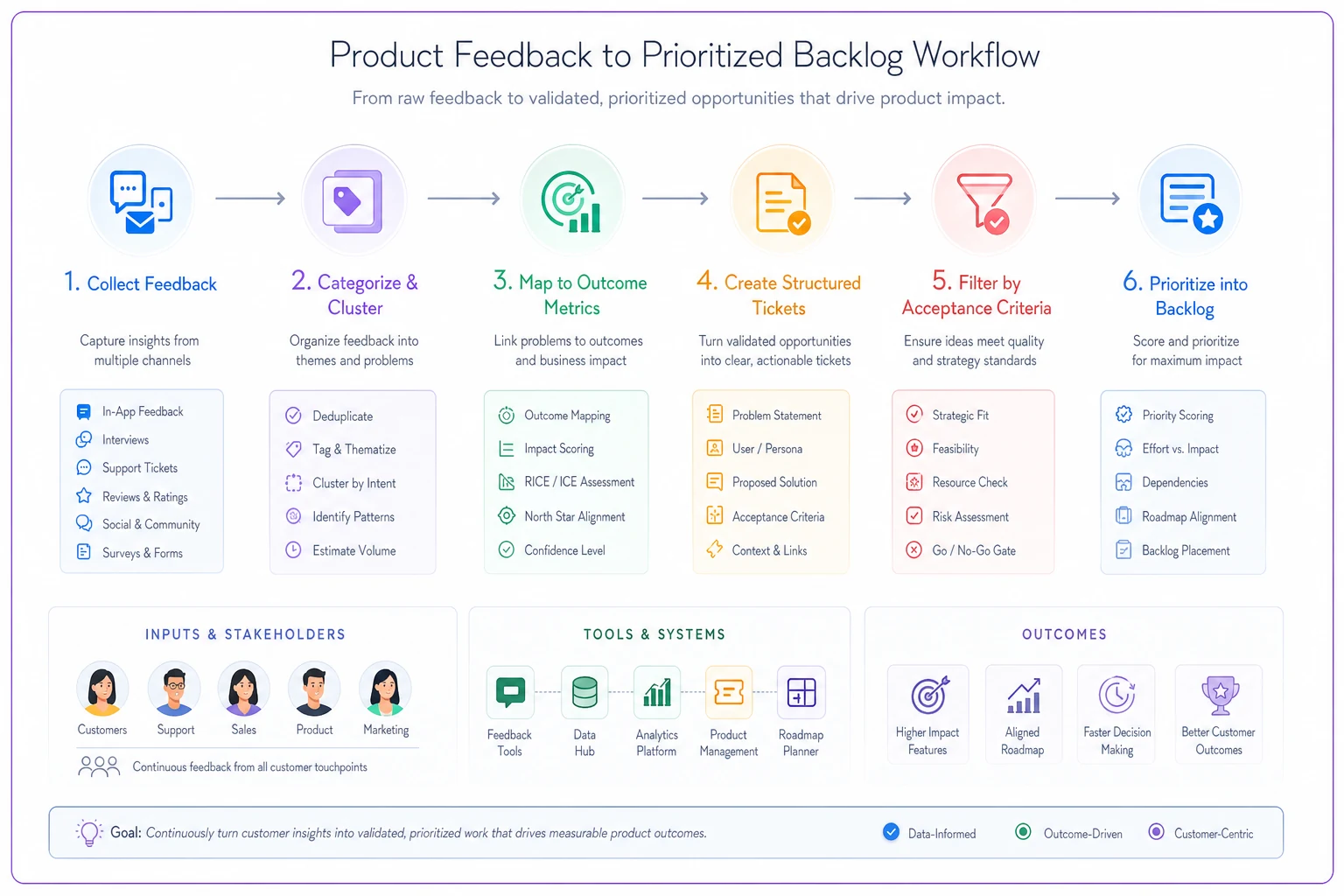
Customer communication closed the loop: support tickets got resolution notices, sales was updated on timelines, and product shared learnings with the community.
Why teams skip the rubric (and pay for it later)
The temptation to skip systematic intake is real. Rubrics feel like bureaucracy. Forms feel like friction. SLAs feel like constraints.
Teams skip rubrics because they think they're too small to need process. "We only get 20 feedback items a week, we can handle it manually." Then growth happens. Twenty becomes fifty. Fifty becomes two hundred. By the time you realize you need a system, you're drowning in backlog debt and all the context has evaporated.
Or they think rubrics slow down development. "We're agile, we need to move fast." But building the wrong features fast isn't agile—it's waste. That emergency feature request that bypassed the rubric? Three months later, usage data shows 2% adoption. Meanwhile, the pattern hiding in your support tickets would have prevented hundreds of churn events.
Some teams believe product intuition is enough. This works until it doesn't. The moment your team grows past five or six people or your user base diversifies, intuition breaks down. Different people have different intuitions. The loudest voice wins. Product coherence disappears.
The compound effect of systematic intake
Good intake compounds. Each properly processed piece of feedback makes the next one easier. Patterns emerge faster. Decisions get clearer. The backlog becomes a strategic asset instead of a guilt-inducing dumping ground.
-
Around 70% less time spent in prioritization meetings
-
Roughly 3x faster from feedback to shipped feature
-
A meaningful reduction in "wrong feature" builds
-
Clear traceability from customer pain to product solution
More importantly, your team stops drowning. Product managers spend time on strategy instead of spreadsheet wrangling. Engineers understand why they're building what they're building. Support sees their feedback actually influence the roadmap. Sales can confidently tell prospects when features are coming.
Building your intake system with operational software
Manual rubrics break down at scale. Spreadsheets can't handle multi-source feedback. Slack threads lose context. Email chains fragment discussions.
Modern AI-powered operational platforms can automatically categorize feedback at intake, detect patterns across sources, and map feedback to metrics without manual intervention. AI automation handles the repetitive transformation work—extracting problem statements from rambling emails, identifying duplicate feedback across channels, surfacing patterns humans miss at volume.
The key is choosing software that enhances your rubric, not replaces it. Automated systems can process volume, but humans still need to set strategy. The best setups combine automated intake with human judgment at decision points. Let the automation handle categorization and pattern detection while your team focuses on strategic prioritization and customer communication.
For teams processing hundreds or thousands of feedback items monthly, operational software with AI automation stops being optional. It maintains context across time in a way human memory simply can't at scale. That support ticket from six months ago becomes suddenly relevant when combined with recent sales feedback and product analytics—and a good system surfaces those connections without anyone having to dig for them.
Start with structure, scale with systems
Your feedback intake doesn't need to be perfect on day one. Start with basic categorization and one outcome metric. Add layers as you learn what signal actually matters for your product. Build the habit of systematic intake before adding complexity.
Every day you operate without a rubric is another day of building features nobody wants while missing problems everybody has. The gap between customer feedback and product backlog isn't a communication problem—it's an operations problem. Fix the operation, fix the product.
The best product teams treat feedback like a production line, not an art project. Raw materials come in, get refined through systematic processes, and emerge as high-value backlog items. No magic, no gut feelings overriding data—just repeatable operations that convert noise into signal, signal into tickets, and tickets into customer value.
That's how you convert customer feedback to backlog items that actually matter.
Ready to elevate your product management?
Join 2,000+ product teams using Itemyly to accelerate delivery, improve alignment, and build better products.